Annotation
- Introduction
- What Are Leo Skills?
- Platform Availability
- Use Cases
- Pros and Cons
- Conclusion
- Frequently Asked Questions
Brave Leo Skills: Create Custom AI Shortcuts for Desktop & Android
Brave Leo Skills enable custom AI shortcuts for tasks like summarization and text improvement in the Brave browser on desktop and Android, boosting productivity with privacy-focused AI.
Introduction
Brave Leo Skills introduces custom AI shortcuts in its browser, allowing users to save prompts for quick activation on desktop and Android, enhancing privacy-focused AI assistance as a new 2025 feature.
What Are Leo Skills?
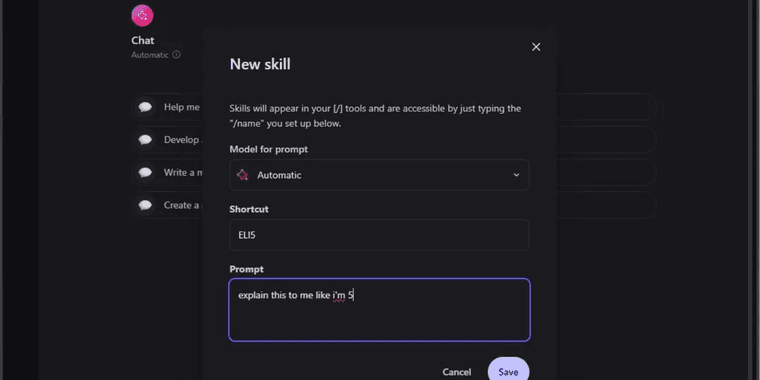
These are customizable shortcuts for Brave's AI assistant, enabling saved prompts for instant use with commands, including built-in skills for text summarization, explanation, and improvement.
Platform Availability
Available on desktop and Android with Brave 1.85+, iOS support planned. Ensures cross-platform AI automation workflows for browser automation AI.
Use Cases
Ideal for journalists summarizing, students explaining, and creators improving text, making Leo more than an AI chatbot—a personalized AI productivity tool.
Pros and Cons
Advantages
- Saves time on repetitive prompts
- Boosts productivity with quick AI actions
- Works on desktop and Android
- Includes useful built-in skills
- Maintains privacy protections
- Customizable for workflows
- Free within Brave browser
Disadvantages
- Not on iOS yet
- Requires Brave 1.85+
- Limited vs standalone AI prompt tools
- Browser constraints
Conclusion
Leo Skills evolves in-browser AI with custom shortcuts, enhancing web browser competitiveness despite platform limits, useful for AI text summarization and improvement tasks.
Frequently Asked Questions
What are Brave Leo Skills?
Brave Leo Skills are customizable shortcuts that let users save and quickly activate frequently used AI prompts within the Brave browser's Leo assistant, eliminating repetitive typing for common tasks.
Which platforms support Brave Leo Skills?
Leo Skills are available on desktop and Android devices running Brave browser version 1.85 or higher. iOS support is planned for a future update but not currently available.
How do I create a custom Leo Skill?
Users can create Leo Skills by saving frequently used prompts in the Brave browser's Leo assistant interface, assigning names for quick access and customization.
What built-in skills are available in Leo Skills?
Built-in skills include text summarization, topic explanation, and writing improvement, designed for common browsing tasks to enhance AI assistance.
Is Brave Leo Skills free to use?
Yes, Leo Skills is free to use within the Brave browser, with no additional cost for the AI shortcuts feature, maintaining privacy protections.
Relevant AI & Tech Trends articles
Stay up-to-date with the latest insights, tools, and innovations shaping the future of AI and technology.
Stoat Chat App: Complete Guide to Revolt Rebranding and Features
Stoat chat app rebranded from Revolt due to legal pressures, maintaining all user data, features, and privacy focus without any required actions from existing users for a seamless transition.
Zorin OS 18: Modern Linux OS with Windows App Support & New Features
Zorin OS 18 is a Linux distribution with a redesigned desktop, enhanced Windows app support, and web apps tool, ideal as a Windows 10 alternative with long-term support until 2029.
AV Linux 25 & MX Moksha 25 Released with Enhanced File Manager & VM Features
AV Linux 25 and MX Moksha 25 are new Linux releases based on Debian Trixie, featuring enhanced file management with Quickemu and YT-DLP integration, tailored for multimedia production and lightweight computing.