Annotation
- Introduction
- How Annotation Mode Works
- Benefits for Development Teams
- Pros and Cons
- Conclusion
- Frequently Asked Questions
Google AI Studio Annotation Mode: Direct App Refinement with Gemini AI
Google AI Studio's annotation mode enables visual component highlighting and automated code refinements using Gemini AI, enhancing development speed and team collaboration for app projects.
Introduction
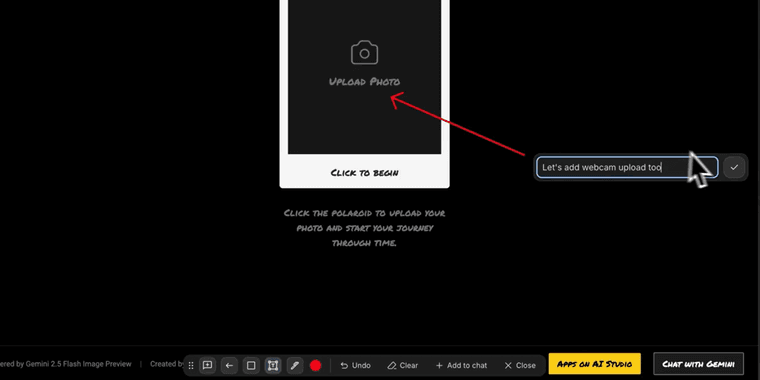
Google AI Studio has introduced a powerful annotation mode, allowing developers to visually highlight UI components directly within their applications. This feature leverages Gemini AI to automate refinements, significantly reducing manual coding efforts and accelerating development cycles.
How Annotation Mode Works
With annotation mode, users can select any element – buttons, text fields, or entire components – and Gemini automatically generates the necessary code adjustments. This multimodal AI integration supports both visual and textual modifications, making it ideal for rapid prototyping and iterative design. For developers exploring AI automation platforms, this represents a major step forward in visual development tools.
Benefits for Development Teams
The annotation feature streamlines collaboration between designers and developers by providing a shared visual language for requested changes. Teams working with AI APIs and SDKs can now implement UI modifications without extensive back-and-forth communication. This is particularly valuable for AI agents and assistants that require frequent interface updates based on user feedback.
Pros and Cons
Advantages
- Reduces manual coding time by automating UI changes
- Improves collaboration between design and development teams
- Supports rapid prototyping and iterative design processes
- Integrates seamlessly with existing Gemini AI capabilities
- Provides visual feedback for precise element targeting
Disadvantages
- Limited to supported UI frameworks and platforms
- May require learning curve for non-technical team members
- Potential accuracy issues with complex component hierarchies
Conclusion
Google AI Studio's annotation mode marks a significant advancement in AI-powered development tools, bridging the gap between visual design and code implementation. As developers increasingly adopt AI writing tools and code formatters, this visual annotation capability provides a natural extension for modern development workflows, promising faster iteration and more intuitive app refinement processes.
Frequently Asked Questions
What is Google AI Studio annotation mode?
Annotation mode in Google AI Studio allows developers to visually highlight UI components within their applications, with Gemini AI automatically generating the necessary code adjustments for refinement.
How does annotation mode improve development workflow?
It reduces manual coding by automating UI changes, improves collaboration between teams, and supports rapid prototyping through visual component selection and AI-powered refinements.
What is Gemini AI's role in annotation mode?
Gemini AI automates the code generation for UI changes based on visual annotations, allowing for quick refinements without manual coding and enhancing development efficiency.
Which UI frameworks support annotation mode?
Annotation mode currently supports popular UI frameworks like React and Angular, but compatibility is limited to certain platforms and may not include all frameworks.
Can non-developers use annotation mode?
While designed for developers, annotation mode has a user-friendly interface that may be accessible to designers with technical guidance, though a learning curve exists for non-technical users.
Relevant AI & Tech Trends articles
Stay up-to-date with the latest insights, tools, and innovations shaping the future of AI and technology.
Stoat Chat App: Complete Guide to Revolt Rebranding and Features
Stoat chat app rebranded from Revolt due to legal pressures, maintaining all user data, features, and privacy focus without any required actions from existing users for a seamless transition.
Zorin OS 18: Modern Linux OS with Windows App Support & New Features
Zorin OS 18 is a Linux distribution with a redesigned desktop, enhanced Windows app support, and web apps tool, ideal as a Windows 10 alternative with long-term support until 2029.
AV Linux 25 & MX Moksha 25 Released with Enhanced File Manager & VM Features
AV Linux 25 and MX Moksha 25 are new Linux releases based on Debian Trixie, featuring enhanced file management with Quickemu and YT-DLP integration, tailored for multimedia production and lightweight computing.