Annotation
- Introduction
- New Task Blocking Feature
- Enhanced Reminder System
- Pros and Cons
- Conclusion
- Frequently Asked Questions
Google Calendar Task Blocking & Reminder Syncing Update | Tech News
Google Calendar's new update introduces task blocking and reminder syncing, helping users manage schedules and tasks efficiently within the calendar interface for improved productivity.
Introduction
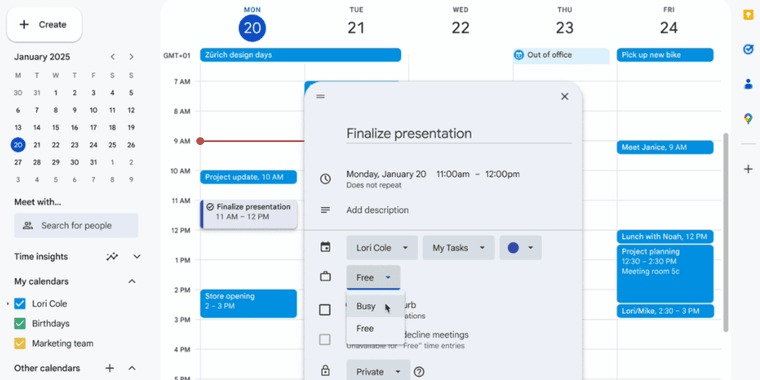
Google Calendar has rolled out a significant update enabling users to block time for tasks directly within the calendar interface. This enhancement supports both Google Workspace and personal accounts, integrating task management with scheduling for improved productivity.
New Task Blocking Feature
Users can now select any empty time slot and assign a task, which automatically syncs with their task list and reminders. Each task allows customization of visibility and do not disturb settings, ensuring focused work periods. This feature is particularly useful for professionals using calendar apps and task managers to organize their day.
Enhanced Reminder System
Reminders for these tasks persist until marked complete, helping users stay on track. The integration supports time tracking by logging scheduled blocks, and it complements tools like online scheduling systems. This update is part of Google's push to enhance productivity hacks within its ecosystem.
Pros and Cons
Advantages
- Seamlessly integrates tasks with calendar scheduling
- Customizable visibility and do not disturb options
- Works across Google Workspace and personal accounts
- Improves time management and focus
- Automatic reminder syncing until completion
Disadvantages
- May require learning for new users
- Limited to Google ecosystem integration
- Basic compared to dedicated task tools
Conclusion
This Google Calendar update effectively bridges task and schedule management, offering a streamlined approach for busy users. By leveraging this feature, individuals and teams can boost efficiency and maintain better control over their daily priorities.
Frequently Asked Questions
How do I block tasks in Google Calendar?
Select an empty time slot, click on 'Task', customize settings like visibility and do not disturb, and it will sync with your task list and reminders.
Is this feature available for personal Google accounts?
Yes, the task blocking and reminder syncing feature is available for both Google Workspace and personal account users at no extra cost.
What are the benefits of task blocking?
Task blocking seamlessly integrates tasks with calendar scheduling, improves time management and focus, and automatically syncs reminders until completion.
Can I customize task settings?
Yes, each task allows customization of visibility and do not disturb settings to ensure focused work periods and better control over notifications.
Does this work with other productivity tools?
The feature integrates within the Google ecosystem and complements tools like online scheduling and time tracking, but is primarily designed for Google Calendar.
Relevant AI & Tech Trends articles
Stay up-to-date with the latest insights, tools, and innovations shaping the future of AI and technology.
Stoat Chat App: Complete Guide to Revolt Rebranding and Features
Stoat chat app rebranded from Revolt due to legal pressures, maintaining all user data, features, and privacy focus without any required actions from existing users for a seamless transition.
Zorin OS 18: Modern Linux OS with Windows App Support & New Features
Zorin OS 18 is a Linux distribution with a redesigned desktop, enhanced Windows app support, and web apps tool, ideal as a Windows 10 alternative with long-term support until 2029.
AV Linux 25 & MX Moksha 25 Released with Enhanced File Manager & VM Features
AV Linux 25 and MX Moksha 25 are new Linux releases based on Debian Trixie, featuring enhanced file management with Quickemu and YT-DLP integration, tailored for multimedia production and lightweight computing.