Annotation
- Introduction
- Key Features Overview
- Practical Implementation
- Pros and Cons
- Conclusion
- Frequently Asked Questions
Brave Android Update: CSV Password Import & Menu Customization Features
Brave's Android update adds CSV password import and menu customization, enhancing user convenience and personalization for a better browsing experience.
Introduction
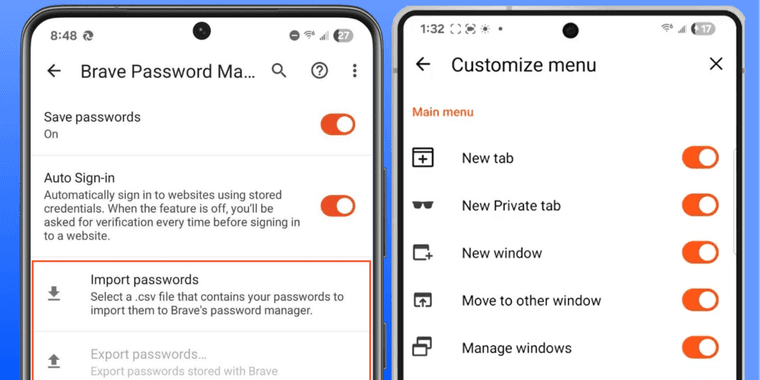
Brave's latest Android browser update introduces two significant quality-of-life improvements: CSV password import functionality and enhanced menu customization. These features address common user requests for easier credential migration and personalized interface control.
Key Features Overview
The CSV password import tool simplifies switching from other browsers by allowing users to export their saved credentials as CSV files from platforms like Chrome or Firefox, then import them directly into Brave. This eliminates manual password re-entry while maintaining security standards. The menu customization option lets users hide rarely used buttons, creating a cleaner interface tailored to individual browsing habits. These enhancements align with Brave's commitment to user-centric web browser development.
Practical Implementation
To import passwords, navigate to Brave's settings, select "Passwords," and choose "Import." The system accepts standard CSV formats containing website URLs, usernames, and passwords. For menu personalization, long-press any main menu item to access hide/show options. This flexibility is particularly valuable for users who prioritize streamlined app customization experiences.
Pros and Cons
Advantages
- Simplifies migration from other browsers with CSV import
- Reduces manual password entry time and errors
- Customizable interface improves user experience
- Maintains Brave's strong privacy and security standards
- Free features enhance browser accessibility
Disadvantages
- CSV format requires export from source browser first
- Limited to basic credential fields in import process
- Menu customization options could be more extensive
Conclusion
Brave's new CSV password import and menu customization features represent meaningful steps toward better user convenience and personalization. While the implementation has some limitations, these tools significantly ease the transition from other browsers and allow for interface tailoring. For Android users seeking privacy-focused browsing with improved usability, this update delivers valuable functionality that complements Brave's existing anti-tracking and ad-blocking capabilities.
Frequently Asked Questions
How do I import passwords to Brave Android using CSV?
Go to Settings > Passwords > Import in Brave Android, select your CSV file containing website URLs, usernames, and passwords exported from another browser.
Can I customize the Brave Android main menu?
Yes, long-press any main menu item to access hide/show options, allowing you to remove buttons you don't frequently use for a cleaner interface.
What formats are supported for password import?
Brave supports standard CSV formats containing website URLs, usernames, and passwords for import.
Can I hide multiple menu items?
Yes, you can long-press and hide multiple items in the main menu to customize your interface.
Does this update affect Brave's privacy features?
No, the update maintains Brave's strong privacy and security standards while adding new functionality.
Relevant AI & Tech Trends articles
Stay up-to-date with the latest insights, tools, and innovations shaping the future of AI and technology.
Stoat Chat App: Complete Guide to Revolt Rebranding and Features
Stoat chat app rebranded from Revolt due to legal pressures, maintaining all user data, features, and privacy focus without any required actions from existing users for a seamless transition.
Zorin OS 18: Modern Linux OS with Windows App Support & New Features
Zorin OS 18 is a Linux distribution with a redesigned desktop, enhanced Windows app support, and web apps tool, ideal as a Windows 10 alternative with long-term support until 2029.
AV Linux 25 & MX Moksha 25 Released with Enhanced File Manager & VM Features
AV Linux 25 and MX Moksha 25 are new Linux releases based on Debian Trixie, featuring enhanced file management with Quickemu and YT-DLP integration, tailored for multimedia production and lightweight computing.