Annotation
- Introduction
- Enhanced AI Features and Interface
- Pros and Cons
- Conclusion
- Frequently Asked Questions
Opera GX AI Update: 20% Faster, New Side Panel & File Upload
The latest Opera GX AI update features a 20% faster engine, redesigned side panel, file upload capabilities, and YouTube video summarization, making it a powerful tool for enhanced browsing productivity.
Introduction
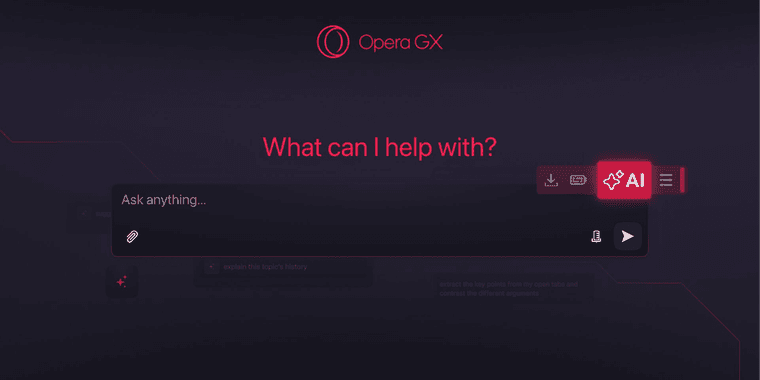
Opera GX, the popular gaming browser, has rolled out a significant AI overhaul. This update introduces a streamlined interface with a dedicated side panel, a new toolbar button for quick access, and a more powerful engine that promises 20% faster response times. Beyond speed, users gain enhanced file analysis capabilities and smarter contextual features.
Enhanced AI Features and Interface
The core of this update is a redesigned AI experience. A new, persistent side panel provides a dedicated space for AI interactions without cluttering your main browsing window. Coupled with a prominent new button on the toolbar, accessing AI tools is now more intuitive than ever. Under the hood, an agentic-based engine drives a noticeable 20% improvement in response speed, making real-time assistance smoother for gamers and power users.
Functionality sees a major boost with new file upload support. Users can now drag and drop various file types – including documents, images, and code snippets – directly into the AI chat for instant analysis and summarization. This transforms the browser into a versatile AI assistant for productivity tasks. The AI also delivers more contextual responses, understanding the content of your active tabs to provide relevant information.
A standout new feature is YouTube video summarization. While watching a video, the AI can generate a concise summary of the key points, saving time for research or learning. For those concerned with privacy, new granular controls allow users to manage how their data is used with the AI features, aligning with modern secure browser expectations.
Pros and Cons
Advantages
- 20% faster AI responses improve real-time usability.
- Dedicated side panel organizes AI tools without clutter.
- File upload support for documents, images, and code.
- YouTube summarization saves time on long videos.
- Enhanced contextual understanding of active web pages.
- New privacy controls for managing AI data usage.
- Toolbar button offers instant, one-click AI access.
Disadvantages
- AI features may increase system resource usage.
- Learning the new interface layout requires brief adjustment.
- Advanced file analysis might be limited to supported formats.
Conclusion
Opera GX's latest AI update solidifies its position as a feature-rich web browser for demanding users. By combining a faster engine with practical tools like file analysis and video summarization, it moves beyond a simple AI chatbot to become a comprehensive productivity hub. The thoughtful interface redesign and added privacy controls make this a compelling upgrade for gamers and professionals alike who want powerful AI integrated directly into their browser workflow.
Frequently Asked Questions
What is the main improvement in the Opera GX AI update?
The main improvement is a 20% faster response time from the new agentic-based AI engine, alongside a completely redesigned interface with a dedicated side panel and toolbar button for easier access.
Can I upload files to Opera GX's AI?
Yes, the update adds support for uploading various file types like documents, images, and code snippets directly into the AI chat for instant analysis and summarization.
How do I access the new AI side panel in Opera GX?
The new AI side panel can be accessed via a dedicated toolbar button or by opening it from the browser menu, providing persistent access without interrupting your browsing.
What file types are supported for upload to the AI?
Supported file types include documents (e.g., PDF, Word), images (e.g., JPG, PNG), and code snippets, allowing for versatile analysis and summarization.
How does the YouTube summarization feature work?
While watching a YouTube video, the AI can generate a concise summary of key points by analyzing the video content, saving time for research or learning purposes.
Relevant AI & Tech Trends articles
Stay up-to-date with the latest insights, tools, and innovations shaping the future of AI and technology.
Stoat Chat App: Complete Guide to Revolt Rebranding and Features
Stoat chat app rebranded from Revolt due to legal pressures, maintaining all user data, features, and privacy focus without any required actions from existing users for a seamless transition.
Zorin OS 18: Modern Linux OS with Windows App Support & New Features
Zorin OS 18 is a Linux distribution with a redesigned desktop, enhanced Windows app support, and web apps tool, ideal as a Windows 10 alternative with long-term support until 2029.
AV Linux 25 & MX Moksha 25 Released with Enhanced File Manager & VM Features
AV Linux 25 and MX Moksha 25 are new Linux releases based on Debian Trixie, featuring enhanced file management with Quickemu and YT-DLP integration, tailored for multimedia production and lightweight computing.