Annotation
- Introduction
- Enhanced Writing Workflow
- Streamlined Content Development
- Pros and Cons
- Conclusion
- Frequently Asked Questions
Paste Integrates Apple Intelligence for Writing & Proofreading Tools
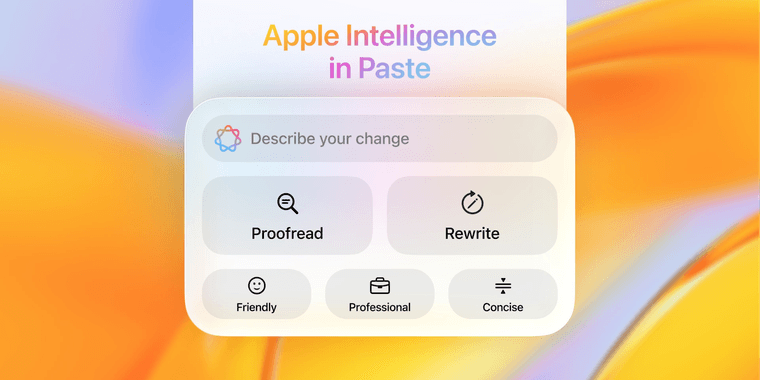
The Paste clipboard manager now features Apple Intelligence integration, providing advanced writing assistance and proofreading tools directly within the app for Mac and iOS devices.
Introduction
Paste integrates Apple Intelligence for in-app writing and proofreading, transforming content creation on Apple devices.
Enhanced Writing Workflow
This integration upgrades writing tools with AI-powered real-time proofreading, grammar checks, and content refinement without app switching, advancing productivity in the Apple ecosystem.
Users access text editing tools that analyze style, suggest improvements, and polish content for various writing scenarios.
Streamlined Content Development
The update consolidates writing functions into one interface, eliminating external software needs. It benefits clipboard manager users with quick refinement and contextual suggestions beyond spell-checking.
For AI tool explorers, it shows how specialized tools enhance functionality while maintaining simplicity for professionals.
Pros and Cons
Advantages
- Seamless integration with Apple's AI ecosystem
- Real-time writing suggestions and improvements
- Consolidated workflow reduces app switching
- Enhanced proofreading beyond basic spell check
- Works across Mac, iPad, and iPhone devices
- Contextual content refinement suggestions
- Improves overall writing quality and clarity
Disadvantages
- Limited to Apple ecosystem users only
- Requires latest operating system versions
- May have learning curve for new AI features
- Dependent on Apple Intelligence availability
Conclusion
Paste's Apple Intelligence integration advances writing tools by combining clipboard management with AI assistance, offering a comprehensive solution for content creation and refinement, positioning it as a top choice for professionals.
Frequently Asked Questions
What does Apple Intelligence integration add to Paste?
Apple Intelligence brings advanced writing assistance, real-time proofreading, grammar checking, and content refinement features directly within the Paste app, eliminating the need for external writing tools.
Which devices support Paste's new AI features?
The Apple Intelligence integration works across compatible Apple devices including Mac computers, iPads, and iPhones running the latest operating system versions that support these AI capabilities.
How does Paste's AI improve writing quality?
Paste's AI analyzes writing style, suggests improvements, and helps polish content to professional standards, enhancing clarity and impact for various writing scenarios.
Is there a cost for using Apple Intelligence in Paste?
Apple Intelligence features are typically included with compatible Apple devices and OS, but check Paste's pricing for any additional costs, as basic features may be free.
Can Paste be used without an internet connection?
Basic clipboard functions in Paste can be used offline, but AI features like real-time proofreading may require internet access for processing.
Relevant AI & Tech Trends articles
Stay up-to-date with the latest insights, tools, and innovations shaping the future of AI and technology.
Stoat Chat App: Complete Guide to Revolt Rebranding and Features
Stoat chat app rebranded from Revolt due to legal pressures, maintaining all user data, features, and privacy focus without any required actions from existing users for a seamless transition.
Zorin OS 18: Modern Linux OS with Windows App Support & New Features
Zorin OS 18 is a Linux distribution with a redesigned desktop, enhanced Windows app support, and web apps tool, ideal as a Windows 10 alternative with long-term support until 2029.
AV Linux 25 & MX Moksha 25 Released with Enhanced File Manager & VM Features
AV Linux 25 and MX Moksha 25 are new Linux releases based on Debian Trixie, featuring enhanced file management with Quickemu and YT-DLP integration, tailored for multimedia production and lightweight computing.