Annotation
- Introduction
- Enhanced Profile Management Features
- Accessibility and User Experience
- Pros and Cons
- Conclusion
- Frequently Asked Questions
Firefox Profile Management: Separate Work & Personal Browsing | ToolPicker
Firefox's enhanced profile management, available from October 14, helps users securely separate work, personal, and school browsing with isolated data, extensions, and themes.
Introduction
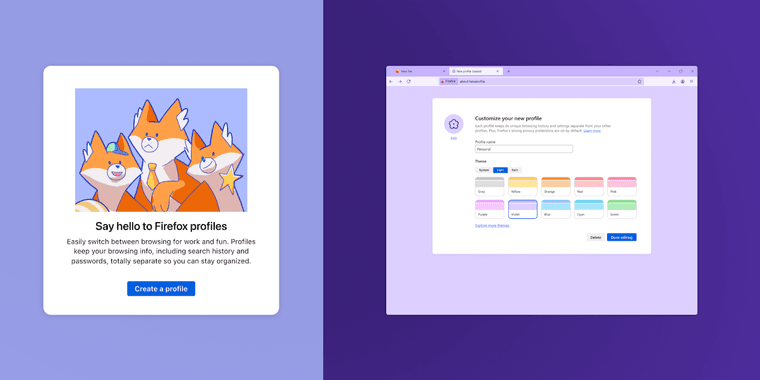
Firefox launches enhanced profile management on October 14, enabling users to create separate browsing spaces for work, personal, and school activities within one browser.
Enhanced Profile Management Features
The new profile system offers isolated spaces with dedicated bookmarks, logins, history, extensions, and themes. This improves upon the hidden about:profiles page, making profile setup intuitive.
Mozilla introduced these tools with Firefox 138 in April 2025, using a gradual rollout to test functionality before the October public release for stability.
Accessibility and User Experience
Developed with accessibility experts, the interface benefits all users, especially those with disabilities, by establishing digital boundaries and reducing cognitive load.
Pros and Cons
Advantages
- Complete separation of work and personal browsing data
- Individual extension sets for different use cases
- Enhanced privacy through isolated login sessions
- Improved organization with separate bookmarks
- Custom themes for different browsing contexts
- Accessible design for users with disabilities
- No additional software installation required
Disadvantages
- Initial setup requires manual profile configuration
- Limited to Firefox browser ecosystem
- May require habit adjustment for switching profiles
- No automatic profile synchronization across devices
Conclusion
Firefox's profile management advances browser organization and privacy. By revealing hidden features, Mozilla supports tailored browsing, with the October 14 rollout marking progress in secure identity management.
Frequently Asked Questions
When will Firefox profile management be available to all users?
The enhanced profile management features will become available to all Firefox users starting October 14, following a gradual rollout that began with Firefox 138 in April 2025.
What data is separated between Firefox profiles?
Each Firefox profile maintains completely separate bookmarks, login credentials, browsing history, installed extensions, and visual themes, providing true isolation between different browsing contexts.
How can I create a new profile in Firefox?
You can create a new profile via the Firefox menu or by visiting about:profiles in the address bar, then following the on-screen instructions to set up a separate browsing environment.
Can each Firefox profile have different visual themes?
Yes, each profile supports custom themes, allowing you to personalize the appearance for different browsing contexts like work or personal use.
Is profile management available in Firefox for mobile?
The enhanced profile management is primarily designed for desktop Firefox, with limited profile options on mobile versions at this time.
Relevant AI & Tech Trends articles
Stay up-to-date with the latest insights, tools, and innovations shaping the future of AI and technology.
Stoat Chat App: Complete Guide to Revolt Rebranding and Features
Stoat chat app rebranded from Revolt due to legal pressures, maintaining all user data, features, and privacy focus without any required actions from existing users for a seamless transition.
Zorin OS 18: Modern Linux OS with Windows App Support & New Features
Zorin OS 18 is a Linux distribution with a redesigned desktop, enhanced Windows app support, and web apps tool, ideal as a Windows 10 alternative with long-term support until 2029.
AV Linux 25 & MX Moksha 25 Released with Enhanced File Manager & VM Features
AV Linux 25 and MX Moksha 25 are new Linux releases based on Debian Trixie, featuring enhanced file management with Quickemu and YT-DLP integration, tailored for multimedia production and lightweight computing.