Annotation
- Introduction
- Unlocking AI Potential for Line Art Conversion
- ChatGPT as Your AI Conversion Assistant
- Step-by-Step Conversion Process
- Vector Conversion for Laser Engraving
- Optimizing Conversion Results
- Creative Applications
- Alternative Tools and Methods
- Pros and Cons
- Conclusion
- Frequently Asked Questions
Convert Photos to Line Art with ChatGPT for Laser Engraving | AI Guide
Learn how to use ChatGPT for converting photos to line art suitable for laser engraving, with step-by-step guides, prompt optimization, and vector

Introduction
Transforming photographs into clean line art has become remarkably accessible through artificial intelligence. This comprehensive guide demonstrates how to leverage ChatGPT for converting images into laser-engraving-ready line art, complete with practical techniques for optimal results. Whether you're an experienced engraver or exploring creative projects, AI-assisted conversion opens new possibilities for personalized gifts, custom home decor, and professional signage. Discover how to harness this powerful technology while understanding its capabilities and limitations.
Unlocking AI Potential for Line Art Conversion
Line art conversion serves as a fundamental process in numerous creative applications, particularly within laser engraving workflows. The simplified, clean representation of images through line art makes it perfect for etching detailed designs onto various materials including wood, acrylic, and metal surfaces. The precision and clarity of well-executed line art ensure that design elements reproduce faithfully during the engraving process, significantly enhancing the visual appeal of finished products.
Beyond aesthetic benefits, line art offers exceptional scalability and manipulation flexibility without quality degradation. This characteristic proves invaluable when adapting designs for different project sizes or material types. Whether creating personalized memorial pieces, decorative household items, or commercial identification plaques, mastering line art conversion represents an essential skill for modern creators.
ChatGPT as Your AI Conversion Assistant
OpenAI's ChatGPT has transformed how users interact with artificial intelligence, extending beyond text-based conversations to include image processing capabilities. This versatility makes it an excellent tool for creative tasks, including photograph-to-line-art conversion. The platform's ability to analyze uploaded images and generate corresponding line art provides a user-friendly, efficient solution for designers and hobbyists alike.
Through ChatGPT's interface, users can upload images, provide specific conversion instructions, and receive high-quality line art within seconds. This approach eliminates the need for complex, expensive design software, making professional-quality conversions accessible to broader audiences. The AI-driven process handles intricate images with surprising precision, creating opportunities for sophisticated laser engraving projects that previously required advanced technical skills.
Step-by-Step Conversion Process
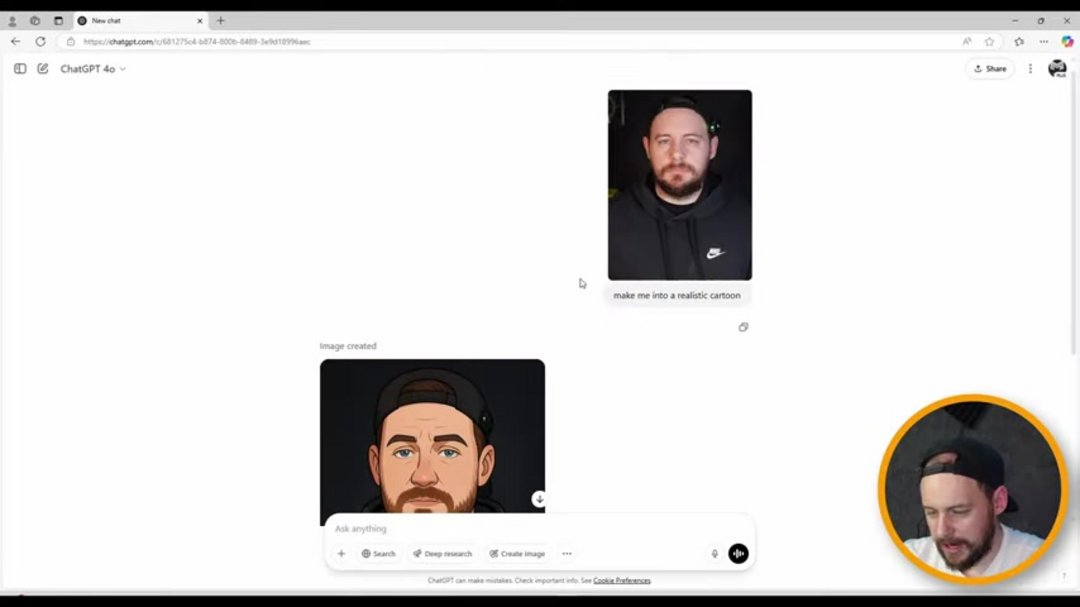
Begin by preparing your source image, ensuring it displays good lighting, clear focus, and minimal visual noise. Access ChatGPT through its web interface or application – while basic access remains available without registration, creating an account enables photo uploads and preference saving. The straightforward interface presents a conversation prompt where you'll initiate the conversion process.
Upload your photograph by selecting the plus icon in the chat window and choosing the appropriate file from your device. Alternatively, you can paste images directly into the interface. Crafting effective prompts proves crucial for successful conversions – instead of generic requests, use specific instructions like "convert to black and white vector line art with thickened outlines" or "create simplified line art suitable for wood engraving."
Experiment with different phrasing to achieve optimal results for your specific image characteristics. After receiving the initial conversion, evaluate whether the output meets your requirements. If necessary, refine your prompts through subsequent interactions, requesting adjustments like simplified details, bolder lines, or background removal. For laser engraving applications, prioritize clear, well-defined line art with minimal visual clutter.
Vector Conversion for Laser Engraving
ChatGPT typically outputs line art as PNG files – raster images that don't scale effectively for engraving projects. Convert these to vector formats using dedicated design software to ensure infinite scalability without quality loss. Popular options include Inkscape (free, open-source) and Adobe Illustrator (professional subscription). Both applications feature automatic tracing tools – "Trace Bitmap" in Inkscape and "Image Trace" in Illustrator – that convert raster images to editable vector paths.
After conversion, refine your vector line art by adjusting stroke weights, removing unnecessary anchor points, and optimizing the design for your specific engraving material. This crucial step ensures your final design will engrave cleanly regardless of size adjustments. The vector format also allows easy integration with various laser engraving software and hardware configurations.
Optimizing Conversion Results
Start with high-quality source images featuring strong contrast and clear subjects. Well-lit, in-focus photographs with minimal background distractions yield the best conversion outcomes. When crafting prompts, incorporate specific details about your desired outcome – mention line thickness preferences, simplification levels, and any elements to emphasize or exclude.
Don't hesitate to experiment with multiple prompt variations. ChatGPT's AI learns from successive interactions, often producing increasingly refined results with repeated attempts. Leverage the platform's memory feature to maintain consistent conversion parameters across multiple images, saving significant time when processing similar photographs. For those exploring other AI image generators, similar principles apply regarding prompt specificity and iterative refinement.
Creative Applications
Personalized gifts represent one of the most popular uses for AI-generated line art. Convert photographs of family members, pets, or significant moments into engraving-ready designs for wooden plaques, acrylic keychains, or metal jewelry. The personal connection embodied in these custom pieces often makes them cherished keepsakes. Home decor projects benefit similarly – create coordinated decorative elements by engraving line art onto wooden signs, ceramic tiles, or glass surfaces.
Commercial applications include branded signage, product identification tags, and promotional items. The clean, professional appearance of well-executed line art enhances brand perception while providing durable identification solutions. Educational institutions can utilize converted diagrams and illustrations to create engaging learning materials that simplify complex concepts through visual representation. Those interested in exploring additional creative tools might consider AI chatbots with advanced image processing capabilities.
Alternative Tools and Methods
While ChatGPT provides excellent conversion capabilities, several alternative solutions exist for those seeking different approaches. Dedicated vector graphics software often includes built-in tracing functions that can convert photographs directly to scalable vectors. Specialized photo editor applications frequently incorporate line art filters and conversion tools with adjustable parameters.
Other AI-powered platforms like Fotor and VanceAI offer single-click line art conversion with varying output quality. When evaluating alternatives, consider factors like cost, learning curve, output format compatibility, and customization options. For those managing multiple creative workflows, investigating AI automation platforms might reveal integrated solutions that streamline the entire process from conversion to engraving preparation.
Pros and Cons
Advantages
- User-friendly interface requiring minimal technical knowledge
- AI-powered precision handling complex image details effectively
- Cost-effective alternative to professional design software
- Memory feature maintains consistency across multiple conversions
- Rapid processing delivers results within seconds
- Versatile performance with various image types and subjects
- Accessible to beginners while useful for professionals
Disadvantages
- Free access includes usage limitations and restrictions
- Output format limited to PNG requiring vector conversion
- Often requires additional refinement in external software
- Prompt dependency means results vary with instruction quality
- Limited control over specific conversion parameters
Conclusion
ChatGPT's image conversion capabilities provide an accessible gateway into laser engraving with AI-assisted line art creation. While the process requires understanding both the AI's strengths and limitations, the results can transform ordinary photographs into engraving-ready designs with minimal technical expertise. Remember that successful conversions combine quality source images, specific prompts, and appropriate post-processing in vector software. As AI technology continues evolving, these tools will likely become even more sophisticated, further democratizing creative expression through laser engraving and other fabrication methods. Whether creating personal mementos or commercial products, AI line art conversion represents a valuable addition to any creator's toolkit.
Frequently Asked Questions
Is ChatGPT free for converting photos to line art?
ChatGPT offers limited free access with image conversion capabilities, but frequent users may need paid membership for unlimited conversions and advanced features.
What file format does ChatGPT use for line art output?
ChatGPT exports line art as PNG files, which are raster images that require conversion to vector formats like SVG for optimal laser engraving results.
Can ChatGPT handle complex images with fine details?
Yes, ChatGPT can process intricate images, but results improve with high-quality source photos and specific prompts guiding the conversion process for better detail preservation.
How do I prepare line art for laser engraving after conversion?
Convert PNG output to vector format using software like Inkscape or Illustrator, then adjust line thickness, remove unnecessary details, and ensure high contrast for clean engraving.
How can I improve line art quality for engraving?
Use high-contrast source images, specific prompts for line thickness, and convert to vector format for scalability and clean engraving results.
Relevant AI & Tech Trends articles
Stay up-to-date with the latest insights, tools, and innovations shaping the future of AI and technology.
Grok AI: Free Unlimited Video Generation from Text & Images | 2024 Guide
Grok AI offers free unlimited video generation from text and images, making professional video creation accessible to everyone without editing skills.
Top 3 Free AI Coding Extensions for VS Code 2025 - Boost Productivity
Discover the best free AI coding agent extensions for Visual Studio Code in 2025, including Gemini Code Assist, Tabnine, and Cline, to enhance your
Grok 4 Fast Janitor AI Setup: Complete Unfiltered Roleplay Guide
Step-by-step guide to configuring Grok 4 Fast on Janitor AI for unrestricted roleplay, including API setup, privacy settings, and optimization tips