Annotation
- Introduction
- Unified AI Agent Ecosystem
- Mission Control: Centralized Management
- Visual Studio Code Integration
- Enterprise-Grade Features
- Pros and Cons
- Conclusion
- Frequently Asked Questions
GitHub Agent HQ: Central Hub for AI Coding Agents from Top Providers
GitHub unveils Agent HQ, a unified platform that centralizes AI coding assistants from Anthropic, OpenAI, Google, and xAI, accessible via Copilot subscriptions for enhanced developer productivity.
Introduction
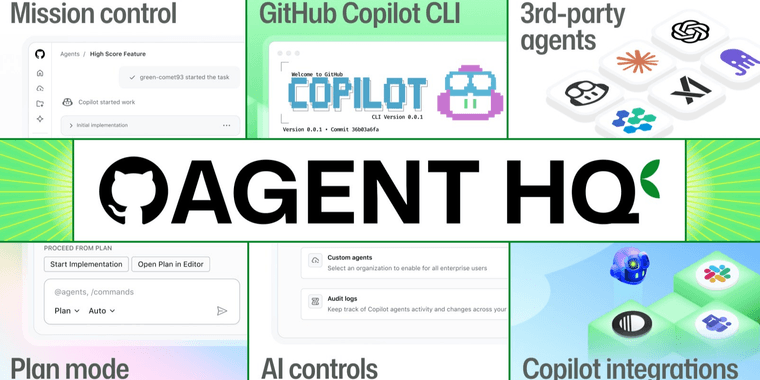
GitHub launched Agent HQ, a platform that centralizes AI coding agents from providers like Anthropic, OpenAI, Google, and xAI. Announced at GitHub Universe, it allows developers to access multiple AI models through Copilot subscriptions, streamlining coding workflows.
Unified AI Agent Ecosystem
Agent HQ integrates AI agents from top companies, enabling developers to use specialized capabilities without switching tools. It addresses market fragmentation by providing a single access point for AI agents and assistants.
Mission Control: Centralized Management
Mission Control is the command center for managing AI agents. Developers can assign tasks, monitor activity, and track metrics across workflows. Available on GitHub, VS Code, mobile, and CLI, it's valuable for enterprise version control teams.
Visual Studio Code Integration
VS Code integration offers customization and task planning. Developers can fine-tune agent behavior in their preferred IDE. Initial rollout includes OpenAI Codex for Copilot Pro+ users in VS Code Insiders.
Enterprise-Grade Features
For enterprises, Agent HQ provides controls like code review and governance. Dashboards monitor AI impact metrics, helping optimize AI APIs and SDKs usage while maintaining security.
Pros and Cons
Advantages
- Centralized access to multiple AI coding models
- Seamless integration with existing GitHub workflows
- Cross-platform availability across development tools
- Enterprise-grade governance and monitoring
- Customizable agent behavior and task planning
- Unified billing through Copilot subscriptions
- Reduced context switching between AI tools
Disadvantages
- Limited to paid Copilot subscription tiers
- Initial rollout includes only select providers
- Potential complexity in managing multiple agents
- Learning curve for optimal agent utilization
Conclusion
GitHub Agent HQ evolves AI-assisted development by unifying top AI coding technologies. It offers centralized access, management tools, and enterprise controls, positioning GitHub as the hub for AI-powered software development.
Frequently Asked Questions
What is GitHub Agent HQ?
GitHub Agent HQ is a centralized platform that brings together AI coding agents from multiple providers including Anthropic, OpenAI, Google, and xAI, allowing developers to access different AI models through their GitHub Copilot subscriptions.
How does Mission Control work in Agent HQ?
Mission Control serves as a centralized command center within Agent HQ, enabling developers to assign tasks, monitor agent activity, and track performance metrics across multiple AI coding assistants from a single interface.
Which AI providers are included in Agent HQ?
Agent HQ includes AI coding agents from leading providers such as Anthropic, OpenAI, Google, and xAI, with more expected to be added in the future.
Is Agent HQ available for all GitHub Copilot subscriptions?
Agent HQ is initially available for paid Copilot subscription tiers, specifically Copilot Pro and above, with features varying by plan.
How does Agent HQ integrate with development tools?
Agent HQ integrates with various development environments including GitHub, Visual Studio Code, mobile applications, and command-line interfaces, providing consistent oversight across platforms.
Relevant AI & Tech Trends articles
Stay up-to-date with the latest insights, tools, and innovations shaping the future of AI and technology.
Stoat Chat App: Complete Guide to Revolt Rebranding and Features
Stoat chat app rebranded from Revolt due to legal pressures, maintaining all user data, features, and privacy focus without any required actions from existing users for a seamless transition.
Zorin OS 18: Modern Linux OS with Windows App Support & New Features
Zorin OS 18 is a Linux distribution with a redesigned desktop, enhanced Windows app support, and web apps tool, ideal as a Windows 10 alternative with long-term support until 2029.
AV Linux 25 & MX Moksha 25 Released with Enhanced File Manager & VM Features
AV Linux 25 and MX Moksha 25 are new Linux releases based on Debian Trixie, featuring enhanced file management with Quickemu and YT-DLP integration, tailored for multimedia production and lightweight computing.