Annotation
- Introduction
- How Manus Browser Operator Works
- Supported Use Cases and Limitations
- Pros and Cons
- Conclusion
- Frequently Asked Questions
Manus Browser Operator Beta: Local Automation for Chrome and Edge
Manus Browser Operator beta enables local automation in Chrome and Edge for authenticated workflows with tools like CrunchBase and Semrush, offering real-time control and audit trails for efficient data tasks.
Introduction
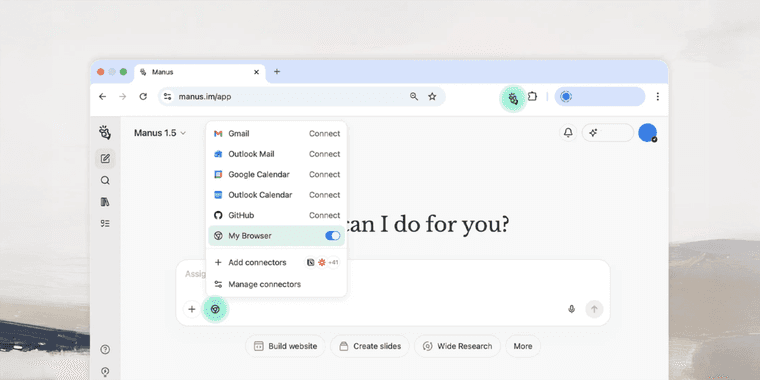
Manus has launched the beta version of its Browser Operator extension, enabling local automation directly within Chrome and Edge browsers. This tool shifts tasks from cloud environments to authenticated local sessions, allowing seamless operation within premium platforms like CrunchBase, PitchBook, and Semrush after a one-time authorization.
How Manus Browser Operator Works
The extension executes through a "My Browser" connector, running workflows in a dedicated tab group where users can monitor, intervene, or halt processes in real time. Unlike cloud-based alternatives, it offers full transparency with detailed action logs and audit trails. This approach is especially useful for AI automation platforms and workflow automation systems requiring secure access to subscription services.
Supported Use Cases and Limitations
Currently, the beta handles multi-step operations including data extraction, analysis, and automated reporting. However, complex interactions like drag-and-drop or multi-field forms may experience inconsistencies. Users should review sensitive data before granting access, particularly when working with data extraction tools and productivity automation solutions.
Pros and Cons
Advantages
- Runs automation directly in local browser sessions
- Provides real-time visibility into workflow execution
- Works with premium research tools and CRMs
- Maintains complete audit trails and action logs
- Allows user intervention at any process step
- Eliminates cloud sandbox latency issues
- Supports complex multi-step data workflows
Disadvantages
- Beta version may have inconsistent performance
- Complex interactions like drag-drop can fail
- Requires careful review of sensitive data access
- Limited to Chrome and Edge browsers currently
Conclusion
Manus Browser Operator represents a significant step forward for local browser automation, particularly for professionals using AI agents and assistants and browser extension managers. While the beta has some limitations, its transparent, user-controlled approach to authenticated session automation makes it promising for research, data collection, and reporting tasks across protected platforms.
Frequently Asked Questions
What browsers support Manus Browser Operator?
The beta currently supports Chrome and Edge browsers, allowing local automation within authenticated sessions for premium platforms and research tools.
How does Manus Browser Operator differ from cloud automation?
It runs workflows directly in your local browser instead of cloud sandboxes, providing real-time visibility, user control, and direct access to authenticated platforms like CRMs and research databases.
What are the key features of Manus Browser Operator?
Key features include local execution in Chrome and Edge, real-time workflow monitoring, audit trails, support for premium tools, and user intervention capabilities.
Is Manus Browser Operator secure for sensitive data?
While it operates locally, users should review data access permissions as the beta may have inconsistencies, and sensitive data should be handled carefully.
Can I automate complex interactions with Manus Browser Operator?
The beta supports multi-step operations but may struggle with complex actions like drag-and-drop; it's best for data extraction and reporting tasks.
Relevant AI & Tech Trends articles
Stay up-to-date with the latest insights, tools, and innovations shaping the future of AI and technology.
Stoat Chat App: Complete Guide to Revolt Rebranding and Features
Stoat chat app rebranded from Revolt due to legal pressures, maintaining all user data, features, and privacy focus without any required actions from existing users for a seamless transition.
Zorin OS 18: Modern Linux OS with Windows App Support & New Features
Zorin OS 18 is a Linux distribution with a redesigned desktop, enhanced Windows app support, and web apps tool, ideal as a Windows 10 alternative with long-term support until 2029.
AV Linux 25 & MX Moksha 25 Released with Enhanced File Manager & VM Features
AV Linux 25 and MX Moksha 25 are new Linux releases based on Debian Trixie, featuring enhanced file management with Quickemu and YT-DLP integration, tailored for multimedia production and lightweight computing.