Annotation
- Introduction
- Enhanced Tab Management
- Early Access Availability
- Pros and Cons
- Conclusion
- Frequently Asked Questions
Opera One R3 Tab Islands: Custom Names & Colors for Better Organization
Opera One R3 introduces customizable Tab Islands with custom names and color options, enhancing browser tab organization and workflow efficiency for early access users.
Introduction
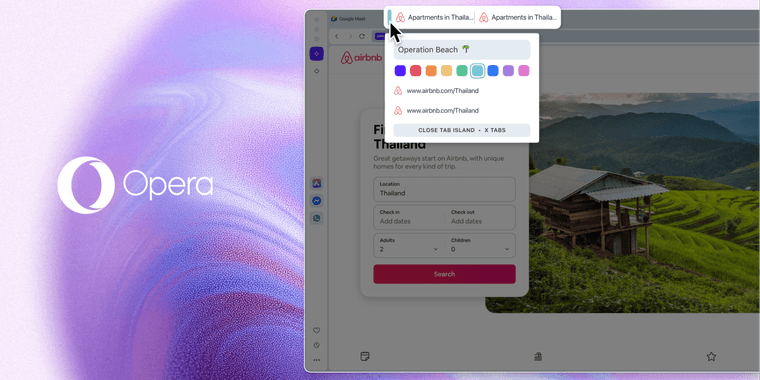
Opera One R3 brings significant personalization upgrades to its innovative Tab Islands feature, allowing users to assign custom names and select handle colors for their tab groups. These enhancements, currently available in early access, transform how users organize their browsing workflow and manage multiple tabs efficiently.
Enhanced Tab Management
The latest Opera One R3 update revolutionizes tab organization through customizable Tab Islands. Users can now assign descriptive names to tab groups and choose from various color options for visual identification. This level of personalization helps distinguish between different projects, research topics, or browsing sessions at a glance.
Tab Islands continue to serve as Opera's core organizational tool, automatically grouping related tabs while maintaining separation between different browsing contexts. The new customization options make this feature even more powerful for users who frequently work with multiple browser windows and extensive tab collections.
Early Access Availability
These customization features are currently rolling out to users in the early access version of Opera One R3. Early adopters can experiment with the new personalization options and provide feedback before wider release. This approach allows Opera to refine the features based on real user experiences and ensure stable performance.
Pros and Cons
Advantages
- Enhanced visual organization with color coding
- Custom naming improves workflow identification
- Automatic tab grouping saves manual effort
- Early access allows user feedback integration
- Seamless integration with existing browser features
- Improved productivity for multi-taskers
Disadvantages
- Currently limited to early access users
- May require learning curve for new users
- Color options might be limited initially
- Customization features add complexity
Conclusion
Opera One R3's enhanced Tab Islands represent a significant step forward in browser tab management. The ability to customize names and colors provides users with unprecedented control over their browsing environment, making it easier to maintain organized workflows across multiple projects. As these features mature through early access testing, they promise to deliver a more personalized and efficient browsing experience for power users and casual browsers alike.
Frequently Asked Questions
What are Tab Islands in Opera One R3?
Tab Islands are Opera's automatic tab grouping feature that organizes related tabs together while keeping different browsing sessions separate for better workflow management.
How do I customize Tab Islands in Opera One R3?
In Opera One R3 early access, right-click on a Tab Island to access customization options including custom names and color selection for visual organization.
What are the main advantages of Tab Islands customization?
Custom names and colors in Tab Islands help visually organize tabs, reduce clutter, and improve workflow efficiency by making it easier to identify different projects or sessions.
How can I access the early version of Opera One R3?
The early access version of Opera One R3 can be downloaded from Opera's official website or through their developer channels, allowing users to test new features before general release.
Are there any limitations to Tab Islands in Opera One R3?
Currently, Tab Islands customization is limited to early access users, and there might be a learning curve for new users, but Opera is continuously improving the feature based on feedback.
Relevant AI & Tech Trends articles
Stay up-to-date with the latest insights, tools, and innovations shaping the future of AI and technology.
Stoat Chat App: Complete Guide to Revolt Rebranding and Features
Stoat chat app rebranded from Revolt due to legal pressures, maintaining all user data, features, and privacy focus without any required actions from existing users for a seamless transition.
Zorin OS 18: Modern Linux OS with Windows App Support & New Features
Zorin OS 18 is a Linux distribution with a redesigned desktop, enhanced Windows app support, and web apps tool, ideal as a Windows 10 alternative with long-term support until 2029.
AV Linux 25 & MX Moksha 25 Released with Enhanced File Manager & VM Features
AV Linux 25 and MX Moksha 25 are new Linux releases based on Debian Trixie, featuring enhanced file management with Quickemu and YT-DLP integration, tailored for multimedia production and lightweight computing.