Annotation
- Introduction
- What is Microsoft Math Solver?
- Key Benefits of Using Math Solver Applications
- Getting Started with Microsoft Math Solver
- Comprehensive Mathematical Coverage
- Advanced Features and Capabilities
- Practical Applications and Use Cases
- Input Method Flexibility
- Pros and Cons
- Integration with Broader Educational Ecosystem
- Accessibility and Inclusivity Features
- Conclusion
- Frequently Asked Questions
Microsoft Math Solver: Free AI Math Tutor with Step-by-Step Solutions
Microsoft Math Solver is a free AI-powered app that helps students solve math problems from arithmetic to calculus with step-by-step explanations,
Introduction
Microsoft Math Solver represents a significant advancement in educational technology, offering AI-powered assistance for mathematics learning. This comprehensive tool helps students and lifelong learners tackle mathematical challenges through intuitive problem-solving methods and detailed explanations. Whether you're struggling with basic arithmetic or advanced calculus, this free application provides the support needed to build confidence and improve mathematical proficiency.
What is Microsoft Math Solver?
Microsoft Math Solver is an innovative educational application developed by Microsoft that leverages artificial intelligence to solve mathematical problems across various difficulty levels. Launched in January 2020, this tool has quickly become essential for students, teachers, and anyone seeking to enhance their mathematical skills. Unlike traditional calculators, Microsoft Math Solver focuses on educational outcomes by providing comprehensive learning support through multiple input methods and detailed solution pathways.

The application stands out among AI chatbots and educational tools for its specialized focus on mathematics education. Key capabilities include:
- Advanced Problem Recognition: The app uses sophisticated AI algorithms to interpret mathematical equations from various input sources
- Multiple Input Methods: Users can scan printed problems, write equations by hand, or type using a specialized mathematical keyboard
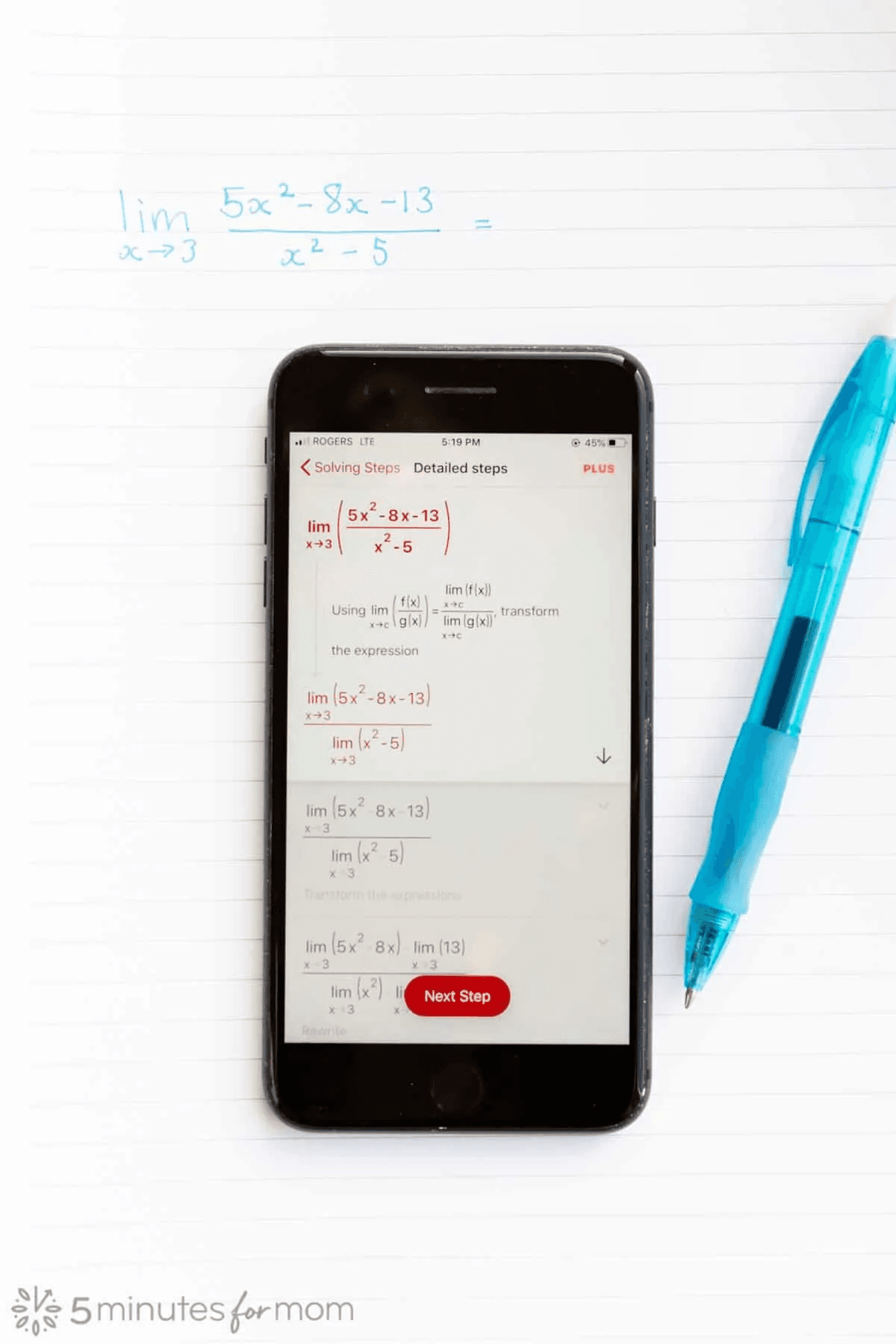
- Comprehensive Solution Steps: Each problem solution includes detailed, step-by-step explanations to facilitate learning
- Interactive Learning Tools: Graphing capabilities and visual representations help users understand complex mathematical concepts
- Additional Resources: Practice quizzes, video tutorials, and related worksheets supplement the core problem-solving features
Key Benefits of Using Math Solver Applications
Mathematics solver applications like Microsoft Math Solver offer numerous advantages for modern learners. The convenience of having a mathematical assistant available anytime, anywhere transforms how people approach learning challenges. These tools significantly reduce the frustration often associated with complex mathematical concepts by providing immediate feedback and guidance.
For students, these applications serve as invaluable homework companions, offering explanations when teachers or tutors might not be available. The step-by-step approach helps build understanding rather than simply providing answers, promoting genuine learning. Teachers can incorporate these tools into their instructional strategies, using them to demonstrate problem-solving techniques or create additional practice materials.
Adult learners benefit from the self-paced nature of these applications, allowing them to refresh mathematical skills for professional development or personal enrichment. The application's integration with AI agents and assistants ensures that users receive accurate, reliable solutions while developing their problem-solving abilities.
Getting Started with Microsoft Math Solver
Beginning your journey with Microsoft Math Solver is straightforward and accessible. The application is available for free download on both major mobile platforms, ensuring broad accessibility. Installation follows standard procedures through official app stores, with no complicated setup requirements.

Once installed, users can immediately start solving mathematical problems using their preferred input method. The scanning feature works particularly well with printed materials, while handwriting recognition accommodates users who prefer writing equations naturally. The typing interface includes specialized mathematical symbols and operators, making it suitable for complex equations that might be challenging to scan or write. The app supports a wide range of mathematical topics, from algebra and geometry to calculus and statistics, ensuring comprehensive coverage for diverse learning needs.
Comprehensive Mathematical Coverage
Microsoft Math Solver supports an impressive range of mathematical topics, making it suitable for learners at various educational levels. The application handles elementary arithmetic operations through advanced calculus concepts with equal proficiency. This breadth of coverage ensures that users can continue using the same tool as their mathematical skills develop and their learning needs evolve.
Specific mathematical domains covered include:
- Elementary Mathematics: Basic arithmetic operations, fractions, decimals, and percentages
- Algebra: Linear equations, quadratic equations, systems of equations, and inequalities
- Geometry: Shape properties, measurements, and geometric calculations
- Trigonometry: Trigonometric functions, identities, and their applications
- Calculus: Differentiation, integration, limits, and differential equations
- Statistics: Descriptive statistics, probability distributions, and statistical analysis
- Matrix Operations: Matrix algebra and related mathematical operations
Advanced Features and Capabilities
Microsoft Math Solver incorporates several advanced features that distinguish it from basic calculator applications. The AI-powered problem recognition system continuously improves through machine learning, ensuring increasingly accurate interpretation of mathematical problems. The step-by-step solution process breaks down complex problems into manageable steps, helping users understand the logical progression from problem to solution.
The interactive graphing feature provides visual representations of equations, particularly valuable for understanding functions, calculus concepts, and trigonometric relationships. This visual approach complements the analytical solutions, offering multiple perspectives on mathematical concepts. The application's integration with AI automation platforms enhances its capability to handle complex mathematical operations efficiently.
Multilingual support makes the application accessible to users worldwide, with interface and explanations available in numerous languages. This global accessibility aligns with Microsoft's commitment to inclusive education and removes language barriers to mathematical learning.
Practical Applications and Use Cases
Microsoft Math Solver finds application in various educational contexts, from formal classroom settings to independent self-study. Students use the application for homework assistance, exam preparation, and concept reinforcement. The immediate feedback and detailed explanations help identify knowledge gaps and address them promptly.
Educators incorporate the tool into their teaching methodologies, using it to demonstrate problem-solving techniques, generate practice materials, and provide additional support for struggling students. The application serves as a valuable supplement to traditional instruction, offering alternative explanations and approaches that might resonate with different learning styles.
Adult learners and professionals use Microsoft Math Solver to refresh mathematical skills for career advancement, standardized test preparation, or personal interest. The self-paced nature of the application accommodates varied schedules and learning preferences. Integration with AI writing tools and other educational technologies creates a comprehensive learning ecosystem.
Input Method Flexibility
The application's multiple input methods cater to different user preferences and situations. The scanning functionality works remarkably well with printed materials, accurately recognizing mathematical notation from textbooks, worksheets, and handwritten notes. This feature saves time and reduces transcription errors that might occur when manually entering complex equations.
Handwriting recognition accommodates users who prefer writing mathematical expressions naturally, mimicking the traditional pencil-and-paper approach while leveraging digital advantages. The specialized mathematical keyboard includes all necessary symbols and operators, organized intuitively for efficient equation entry. These input options ensure that users can interact with the application in the way that feels most comfortable and natural to them.
Pros and Cons
Advantages
- Comprehensive coverage of mathematical topics from basic to advanced
- AI-powered problem recognition with high accuracy rates
- Detailed step-by-step explanations for learning comprehension
- Multiple input methods including scanning and handwriting
- Interactive graphing capabilities for visual learning
- Multilingual support for global accessibility
- Completely free with no hidden costs or subscriptions
Disadvantages
- Limited coverage of highly specialized mathematical topics
- Requires internet connection for full functionality
- Input accuracy depends on clarity of source material
- May not replace deep conceptual understanding
Integration with Broader Educational Ecosystem
Microsoft Math Solver functions effectively as part of a larger educational technology landscape. Its compatibility with other Microsoft educational tools and services creates a cohesive learning environment. The application's design principles align with modern educational approaches that emphasize understanding over memorization and process over answers.
The tool integrates with AI APIs and SDKs to maintain its cutting-edge problem-solving capabilities. Regular updates ensure that the application remains current with educational standards and mathematical advancements. This continuous improvement cycle demonstrates Microsoft's commitment to maintaining the application's relevance and effectiveness.
Accessibility and Inclusivity Features
Microsoft Math Solver incorporates several features that enhance accessibility for diverse user groups. The multilingual interface supports non-native English speakers, while the variety of input methods accommodates different physical abilities and preferences. The application's clean, intuitive design reduces cognitive load, allowing users to focus on mathematical concepts rather than interface navigation.
The absence of advertisements creates an uninterrupted learning environment, particularly important for users with attention challenges. The application's performance across different device types and network conditions ensures reliable access regardless of technical circumstances. These accessibility considerations make mathematical learning more inclusive and equitable.
Conclusion
Microsoft Math Solver represents a significant step forward in mathematics education technology, combining artificial intelligence with thoughtful educational design. Its comprehensive feature set, accessibility, and cost-free model make it an invaluable resource for students, educators, and lifelong learners worldwide. While it doesn't replace traditional learning methods, it serves as a powerful supplement that can enhance understanding, build confidence, and make mathematics more approachable for everyone. As educational technology continues to evolve, tools like Microsoft Math Solver will play an increasingly important role in supporting mathematical literacy and STEM education globally.
Frequently Asked Questions
Is Microsoft Math Solver completely free to use?
Yes, Microsoft Math Solver is completely free with no subscription fees or in-app purchases required. All core features including problem solving, step-by-step explanations, and graphing tools are available at no cost.
What mathematical topics does Microsoft Math Solver cover?
The app covers elementary arithmetic, algebra, geometry, trigonometry, calculus, statistics, and matrix operations. It continuously updates to include additional mathematical topics and problem types.
Can I use Microsoft Math Solver without internet connection?
No, Microsoft Math Solver requires an active internet connection to function as it relies on cloud-based AI algorithms and online resources for problem solving and explanations.
How accurate are the solutions provided by Microsoft Math Solver?
The app provides highly accurate solutions using advanced AI, but accuracy depends on input clarity. Users should verify solutions for complex problems and use the step-by-step explanations to understand the methodology.
Does Microsoft Math Solver support multiple languages?
Yes, the app supports multiple languages including English, Spanish, French, German, Chinese, and others. Language settings can be adjusted within the application preferences.
Relevant AI & Tech Trends articles
Stay up-to-date with the latest insights, tools, and innovations shaping the future of AI and technology.
Grok AI: Free Unlimited Video Generation from Text & Images | 2024 Guide
Grok AI offers free unlimited video generation from text and images, making professional video creation accessible to everyone without editing skills.
Top 3 Free AI Coding Extensions for VS Code 2025 - Boost Productivity
Discover the best free AI coding agent extensions for Visual Studio Code in 2025, including Gemini Code Assist, Tabnine, and Cline, to enhance your
Grok 4 Fast Janitor AI Setup: Complete Unfiltered Roleplay Guide
Step-by-step guide to configuring Grok 4 Fast on Janitor AI for unrestricted roleplay, including API setup, privacy settings, and optimization tips