Annotation
- Introduction
- Enhanced Tag Management
- Advanced Editing Features
- Camera Compatibility & Performance
- Pros and Cons
- Conclusion
- Frequently Asked Questions
digiKam 8.8: Hierarchical Tags, Focus Points & New Blur Tool Features
digiKam 8.8 update introduces hierarchical tag import, focus point preview for cameras, background blur tool, and performance improvements with Qt 6.10 for enhanced photo management.
Introduction
The latest digiKam 8.8 release brings significant workflow enhancements for photographers managing large collections. This open-source photo management software now offers improved tag organization, advanced editing capabilities, and better camera compatibility – making it a compelling alternative to commercial photo editing software solutions.
Enhanced Tag Management
digiKam 8.8 introduces comprehensive hierarchical tag import/export functionality using the Controlled Vocabulary Keyword Catalog (CVKC) format. This allows photographers to maintain consistent tagging structures across different projects and software platforms. The improved drag-and-drop operations and error handling make file organization more reliable than previous versions.
Advanced Editing Features
A new background blur tool enables users to create professional bokeh effects directly within digiKam, reducing the need for external editing software. The updated G'MIC-Qt 3.6.x plugin expands image processing capabilities for both single images and batch editing workflows, offering photographers more creative control over their final output.
Camera Compatibility & Performance
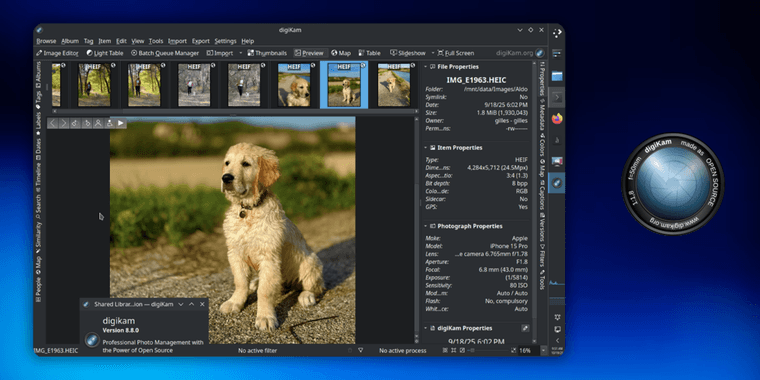
The Preview module now displays focus points for Fujifilm and Olympus/OM Systems cameras by leveraging Exif metadata through ExifTool integration. This feature helps photographers analyze their shooting technique and improve focus accuracy. Underlying performance improvements include migration to Qt 6.10 framework for better responsiveness, native desktop notifications across all platforms, and enhanced stability on Wayland and Windows 11 systems.
Pros and Cons
Advantages
- Free, open-source alternative to paid photo software
- Advanced hierarchical tag management system
- Native focus point display for major camera brands
- Integrated background blur tool for creative effects
- Improved performance with Qt 6.10 framework
- Comprehensive RAW file support and processing
- Multi-platform compatibility across Windows, Mac, Linux
Disadvantages
- Steeper learning curve for beginners
- Limited to ExifTool supported cameras for focus points
- Some advanced features require technical knowledge
- Interface can feel overwhelming for new users
Conclusion
digiKam 8.8 represents a significant step forward for open-source photo management, offering professional-grade features that rival commercial alternatives. The combination of improved tag organization, advanced editing tools, and enhanced camera support makes it an excellent choice for photographers seeking comprehensive metadata management and editing capabilities without subscription fees. Whether you're managing personal collections or professional portfolios, digiKam continues to evolve as a powerful file management solution for digital photographers.
Frequently Asked Questions
What cameras support focus point preview in digiKam 8.8?
digiKam 8.8 displays focus points for Fujifilm and Olympus/OM Systems cameras using Exif metadata through ExifTool integration, helping photographers analyze focus accuracy in their images.
Is digiKam 8.8 completely free to use?
Yes, digiKam remains completely free and open-source software with no subscription fees or hidden costs, making it an affordable alternative to commercial photo management solutions.
What is hierarchical tag import in digiKam 8.8?
Hierarchical tag import allows organizing tags in a tree structure using CVKC format, making it easier to manage and export tagging systems across different projects and software.
How does the background blur tool work in digiKam 8.8?
The background blur tool in digiKam 8.8 lets users apply bokeh effects directly to images, reducing the need for external software and enabling creative edits within the application.
What are the system requirements for digiKam 8.8?
digiKam 8.8 requires a system with Qt 6.10 framework and runs on Windows, macOS, and Linux, with enhanced stability on Wayland and Windows 11 platforms.
Relevant AI & Tech Trends articles
Stay up-to-date with the latest insights, tools, and innovations shaping the future of AI and technology.
Stoat Chat App: Complete Guide to Revolt Rebranding and Features
Stoat chat app rebranded from Revolt due to legal pressures, maintaining all user data, features, and privacy focus without any required actions from existing users for a seamless transition.
Zorin OS 18: Modern Linux OS with Windows App Support & New Features
Zorin OS 18 is a Linux distribution with a redesigned desktop, enhanced Windows app support, and web apps tool, ideal as a Windows 10 alternative with long-term support until 2029.
AV Linux 25 & MX Moksha 25 Released with Enhanced File Manager & VM Features
AV Linux 25 and MX Moksha 25 are new Linux releases based on Debian Trixie, featuring enhanced file management with Quickemu and YT-DLP integration, tailored for multimedia production and lightweight computing.