Annotation
- Introduction
- Enhanced Project Sharing Capabilities
- Future Collaboration Roadmap
- Pros and Cons
- Conclusion
- Frequently Asked Questions
Google Stitch Public Sharing: Read-Only Project Links Now Available
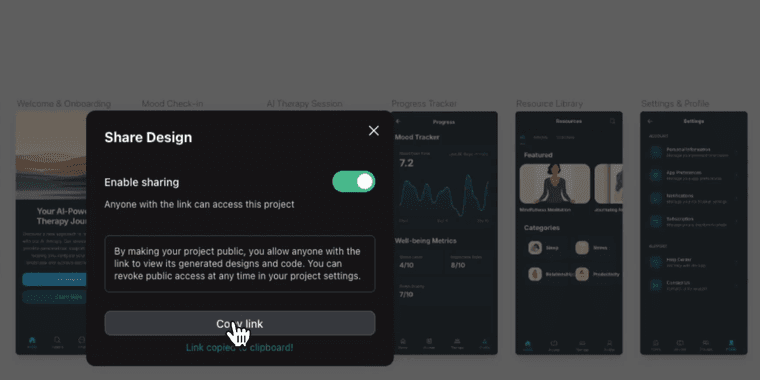
Google Stitch's new feature allows creating public read-only links for design projects, eliminating login barriers to facilitate faster stakeholder feedback and seamless cross-team collaboration.
Introduction
Google Stitch has rolled out a significant update enabling users to generate public read-only links for their design projects. This feature eliminates the login barrier, allowing instant access for stakeholders and collaborators worldwide.
Enhanced Project Sharing Capabilities
The new public sharing functionality transforms how designers distribute their work. Unlike traditional methods requiring account creation, Stitch now generates unique URLs that anyone can access immediately. This streamlined approach accelerates feedback cycles and simplifies client presentations.
For teams using UI design tools, this update represents a major workflow improvement. Designers can now share prototypes with developers, product managers, and clients without complicated access procedures. The platform's integration with other web development tools makes it particularly valuable for cross-functional teams.
Future Collaboration Roadmap
Google indicates this public sharing feature lays groundwork for upcoming collaborative capabilities. A planned 'Remix' function would allow users to create derivative projects from shared designs, potentially revolutionizing how teams iterate on prototyping tools concepts.
The timing aligns with growing demand for seamless collaboration tool integration across design platforms. As remote work continues, features that bridge geographical gaps become increasingly essential for modern design software ecosystems.
Pros and Cons
Advantages
- Instant access without account creation requirements
- Accelerated feedback collection from stakeholders
- Simplified client presentation and review process
- Enhanced cross-team collaboration capabilities
- Foundation for future remixing functionality
- Seamless integration with existing design workflows
Disadvantages
- Limited to view-only access for external users
- Potential security concerns with public links
- No granular permission controls currently available
- Dependent on internet connectivity for access
Conclusion
Google Stitch's public sharing feature marks a significant step toward more accessible design collaboration. By removing login barriers, the platform enables faster iteration and broader stakeholder engagement. As the tool evolves with promised remixing capabilities, it could fundamentally change how design teams collaborate across organizations and with external partners.
Frequently Asked Questions
What is Google Stitch's new public sharing feature?
Google Stitch now allows users to generate public read-only links for design projects, enabling anyone to view them instantly without requiring login credentials or account creation.
How does public sharing benefit design teams?
The feature accelerates feedback cycles, simplifies client presentations, and enables seamless collaboration across teams by eliminating access barriers and streamlining project distribution.
Are there any security risks with Google Stitch's public sharing?
Public links could potentially be accessed by anyone, so sensitive designs might be at risk. However, since it's read-only, users cannot edit or download the projects without permission.
Can I revoke or disable a public link after sharing?
Yes, users can likely disable public links to prevent further access, though specific controls may vary. Check Google Stitch's settings for link management options.
Does public sharing work on mobile devices?
Yes, public read-only links should be accessible on any device with a web browser, including smartphones and tablets, without requiring the Stitch app.
Relevant AI & Tech Trends articles
Stay up-to-date with the latest insights, tools, and innovations shaping the future of AI and technology.
Stoat Chat App: Complete Guide to Revolt Rebranding and Features
Stoat chat app rebranded from Revolt due to legal pressures, maintaining all user data, features, and privacy focus without any required actions from existing users for a seamless transition.
Zorin OS 18: Modern Linux OS with Windows App Support & New Features
Zorin OS 18 is a Linux distribution with a redesigned desktop, enhanced Windows app support, and web apps tool, ideal as a Windows 10 alternative with long-term support until 2029.
AV Linux 25 & MX Moksha 25 Released with Enhanced File Manager & VM Features
AV Linux 25 and MX Moksha 25 are new Linux releases based on Debian Trixie, featuring enhanced file management with Quickemu and YT-DLP integration, tailored for multimedia production and lightweight computing.