Annotation
- Introduction
- Streamlined Export Process
- Workflow Benefits
- Pros and Cons
- Conclusion
- Frequently Asked Questions
Google Stitch 1-Click Export to AI Studio Boosts Workflow Speed
Google Stitch's 1-click export to AI Studio enables instant transfer of HTML and screen data, streamlining workflows and boosting productivity for developers and designers in AI-driven projects.
Introduction
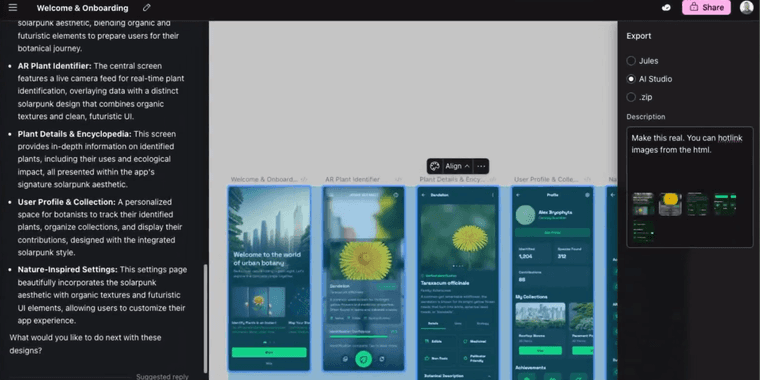
Google Stitch now offers a seamless 1-click export feature directly to AI Studio, eliminating tedious manual transfers. This enhancement accelerates design-to-development workflows, allowing instant sharing of HTML and screen data.
Streamlined Export Process
The new 1-click export in Google Stitch simplifies moving projects into AI Studio. Users can transfer both HTML structures and visual screen data without manual copying or file management. This integration is ideal for AI APIs & SDKs workflows, reducing steps in prototyping and iteration.
Projects created after November 15 support automatic export, while older ones require duplication to align with the updated file system. This feature supports AI automation platforms by enabling rapid testing and deployment of AI-enhanced interfaces.
Workflow Benefits
By integrating Stitch with AI Studio, Google enhances productivity for developers and designers. The tool now fits smoothly into website creator and mockup tool pipelines, supporting real-time collaboration and code generation. Teams can iterate faster, focusing on innovation rather than administrative tasks.
Pros and Cons
Advantages
- Saves time with instant data transfer
- Reduces manual errors in copying code
- Integrates well with Google's AI ecosystem
- Supports both new and duplicated projects
- Enhances team collaboration efficiency
- Accelerates frontend development cycles
- Compatible with various project types
Disadvantages
- Limited to projects after November 15
- Requires duplication for older files
- May need initial setup adjustments
- Dependent on stable internet connection
Conclusion
Google Stitch's 1-click export to AI Studio marks a significant step in workflow automation, bridging design and AI development. It empowers teams using collaboration tools and file transfer automation to achieve faster, more reliable project outcomes.
Frequently Asked Questions
What does Google Stitch's 1-click export to AI Studio do?
It allows users to instantly transfer HTML and screen data from Stitch to AI Studio without manual copying, speeding up design and development workflows.
Which projects support automatic export in Google Stitch?
Projects created after November 15, 2023, support it directly; older projects must be duplicated to enable the feature.
How does the 1-click export improve team collaboration?
It allows instant sharing of project data, enabling real-time collaboration and faster iteration among team members.
What are the system requirements for using Google Stitch's 1-click export?
Users need a stable internet connection and projects created after November 15, 2023, or duplicated older projects to use the feature.
Can the 1-click export handle large projects?
Yes, it supports various project types and sizes, transferring both HTML and visual data efficiently to AI Studio.
Relevant AI & Tech Trends articles
Stay up-to-date with the latest insights, tools, and innovations shaping the future of AI and technology.
Stoat Chat App: Complete Guide to Revolt Rebranding and Features
Stoat chat app rebranded from Revolt due to legal pressures, maintaining all user data, features, and privacy focus without any required actions from existing users for a seamless transition.
Zorin OS 18: Modern Linux OS with Windows App Support & New Features
Zorin OS 18 is a Linux distribution with a redesigned desktop, enhanced Windows app support, and web apps tool, ideal as a Windows 10 alternative with long-term support until 2029.
AV Linux 25 & MX Moksha 25 Released with Enhanced File Manager & VM Features
AV Linux 25 and MX Moksha 25 are new Linux releases based on Debian Trixie, featuring enhanced file management with Quickemu and YT-DLP integration, tailored for multimedia production and lightweight computing.