
Google Jamboard
Google Jamboard was a digital whiteboard for team collaboration. Learn about its shutdown and top alternatives like FigJam and Miro.
Overview of Google Jamboard
Google Jamboard was a collaborative digital whiteboard platform that enabled teams to brainstorm and work together in real-time. As part of the Google Workspace ecosystem, it allowed users to create interactive canvases with drawing tools, sticky notes, and content from Google Drive. Categorized under Virtual Whiteboard and Collaboration Tool, Jamboard supported web, mobile, and physical devices for flexible team collaboration.
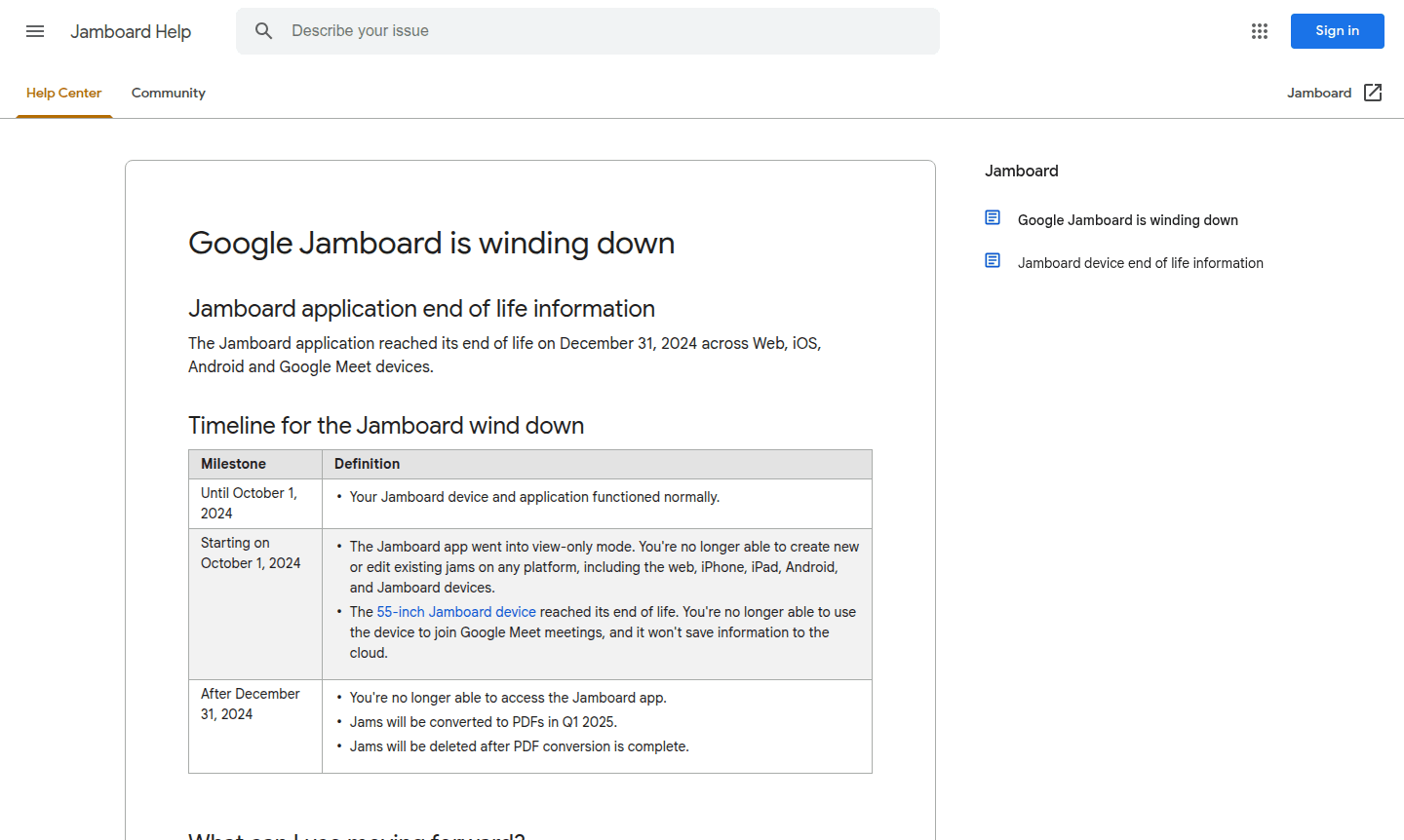
Google announced the end of life for Jamboard on December 31, 2024, with view-only mode starting October 1, 2024. All jams were converted to PDFs in early 2025 before deletion. Users are recommended to migrate to alternatives like FigJam, Lucidspark, and Miro for continued whiteboarding within Google Workspace.
How to Use Google Jamboard
To use Google Jamboard, users accessed it via web browsers, mobile apps, or physical devices. They could create or join jams, collaborate in real-time by adding drawings, text, images, and content from Google Search or Drive. The interface offered intuitive tools for visual idea capture, and the mobile app could control physical Jamboard displays during meetings.
Core Features of Google Jamboard
- Real-time Collaboration – Multiple users could edit jams simultaneously from different locations and devices
- Google Integration – Direct access to content from Drive, Docs, Sheets, and web search results
- Multi-platform Support – Available on web, mobile apps, and dedicated physical whiteboard devices
- Interactive Drawing Tools – Responsive pen and shape tools for natural whiteboard-style sketching
- Content Import – Ability to add images, files, and web content directly into collaborative sessions
Use Cases for Google Jamboard
- Remote team brainstorming sessions and ideation workshops
- Classroom instruction and virtual learning environments for educators
- Project planning and workflow diagramming for business teams
- Design thinking exercises and creative problem-solving meetings
- Presentation development and visual storytelling collaborations
- Agile sprint planning and retrospective meetings for development teams
- Training sessions and workshop facilitation with interactive elements
Support and Contact
For support with Google Jamboard migration, users could access Google Workspace support resources. Since Jamboard has reached end of life, direct support is unavailable. Contact via contact@google.com or visit the Google Workspace support page for assistance with transitioning to alternative whiteboard solutions.
Company Info
Google Jamboard was developed by Google LLC, headquartered in Mountain View, California, United States. More information about Google's current productivity tools can be found on the Google Workspace website.
Login and Signup
Since Google Jamboard reached end of life on December 31, 2024, login and signup functionality is no longer available. Users looking for digital whiteboard alternatives can explore third-party solutions like FigJam, Lucidspark, or Miro, which integrate with Google Workspace.
Google Jamboard FAQ
What happened to Google Jamboard and when did it shut down?
Google Jamboard reached end of life on December 31, 2024, with view-only mode starting October 1, 2024, and complete shutdown after PDF conversion in early 2025.
What are the best Google Jamboard alternatives for team collaboration?
Top Jamboard alternatives include FigJam, Lucidspark, and Miro, which offer advanced whiteboard features and integrate well with Google Workspace.
How can I access my old Google Jamboard files after shutdown?
Google automatically converted jams to PDFs in early 2025, which were saved to Drive before original files were permanently deleted.
Why is my Google Jamboard PDF blank?
A blank PDF indicates possible corruption in the original jam file. Google created blank PDFs as placeholders for such cases.
Google Jamboard Reviews0 review
Would you recommend Google Jamboard? Leave a comment
Google Jamboard Alternatives
The best modern alternatives to the tool
New Tools Releases
Recently added tools
