Annotation
- Introduction
- Enhanced Streaming Capabilities
- Advanced Codec Support
- Professional Exposure Tools
- Pros and Cons
- Conclusion
- Frequently Asked Questions
Blackmagic Camera 3.2 Android Update: Enhanced Streaming & H.265 Support
Blackmagic Camera 3.2 for Android brings professional-grade streaming and production capabilities, including custom targets, SRT support, H.265 codec, and exposure tools for mobile creators.
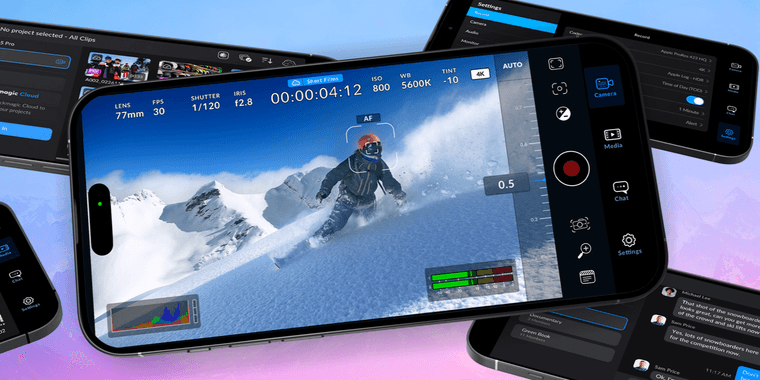
Introduction
Android users can now access the powerful Blackmagic Camera 3.2 update, bringing professional video production features to mobile devices. This release follows the iOS version by three weeks, ensuring cross-platform parity for serious videographers.
Enhanced Streaming Capabilities
The 3.2 update significantly expands live streaming options for Android users. You can now configure custom streaming targets beyond standard platforms, giving creators more flexibility for their broadcast needs. The addition of Secure Reliable Transport (SRT) protocol support enables stable streaming to third-party services, crucial for professional broadcasts where reliability matters.
Advanced Codec Support
H.265 codec integration represents a major step forward for mobile video production. This efficient compression format allows for higher quality streams at lower bitrates, perfect for bandwidth-conscious creators. When combined with other screen capture and game streaming tools, it creates a comprehensive mobile production workflow.
Professional Exposure Tools
Blackmagic has addressed calibration issues with Zebra and False Color exposure tools, ensuring accurate monitoring for proper exposure levels. These professional-grade features help videographers achieve optimal image quality without guesswork. The improvements complement existing photo editor and media catalog applications in a creator's toolkit.
Pros and Cons
Advantages
- Custom streaming targets for flexible broadcasting
- SRT protocol ensures reliable live streaming
- H.265 codec improves streaming efficiency
- Professional exposure tool calibration
- Cross-platform feature parity with iOS
- Enhanced performance and stability
- Free professional camera app for Android
Disadvantages
- Requires compatible streaming services
- Steeper learning curve for beginners
- Limited to newer Android devices
- No built-in video editing features
Conclusion
Blackmagic Camera 3.2 for Android delivers professional-grade streaming and production capabilities to mobile creators. With enhanced codec support, reliable streaming protocols, and improved exposure tools, it bridges the gap between mobile and professional video workflows. This update solidifies Android's position in the video conferencing and content creation landscape.
Frequently Asked Questions
What new streaming features does Blackmagic Camera 3.2 add for Android?
The update adds custom streaming targets, SRT protocol support for reliable third-party streaming, and H.265 codec compatibility for more efficient live broadcasts on compatible services.
How does H.265 codec benefit mobile video streaming?
H.265 provides better compression than H.264, allowing higher quality streams at lower bitrates. This means clearer video with less bandwidth consumption, ideal for mobile streaming scenarios.
What devices are compatible with Blackmagic Camera 3.2 on Android?
Blackmagic Camera 3.2 requires newer Android devices with specific hardware capabilities for optimal performance, though exact requirements may vary.
Is Blackmagic Camera app free to use on Android?
Yes, Blackmagic Camera is a free professional camera app for Android, offering advanced features without cost.
How can I start live streaming with Blackmagic Camera on Android?
To live stream, configure custom streaming targets or use SRT protocol in the app settings, ensuring you have a compatible streaming service.
Relevant AI & Tech Trends articles
Stay up-to-date with the latest insights, tools, and innovations shaping the future of AI and technology.
Stoat Chat App: Complete Guide to Revolt Rebranding and Features
Stoat chat app rebranded from Revolt due to legal pressures, maintaining all user data, features, and privacy focus without any required actions from existing users for a seamless transition.
Zorin OS 18: Modern Linux OS with Windows App Support & New Features
Zorin OS 18 is a Linux distribution with a redesigned desktop, enhanced Windows app support, and web apps tool, ideal as a Windows 10 alternative with long-term support until 2029.
AV Linux 25 & MX Moksha 25 Released with Enhanced File Manager & VM Features
AV Linux 25 and MX Moksha 25 are new Linux releases based on Debian Trixie, featuring enhanced file management with Quickemu and YT-DLP integration, tailored for multimedia production and lightweight computing.