Annotation
- Introduction
- Enhanced Meeting Note Integration
- Practical Applications and Workflow Benefits
- Pros and Cons
- Conclusion
- Frequently Asked Questions
Granola Adds @ Mention Feature for Meeting Notes in Chat | Tech News
Granola launches @ mention feature for meeting notes in chat, enabling AI-powered access to past meetings for summaries, action items, and enhanced team collaboration.
Introduction
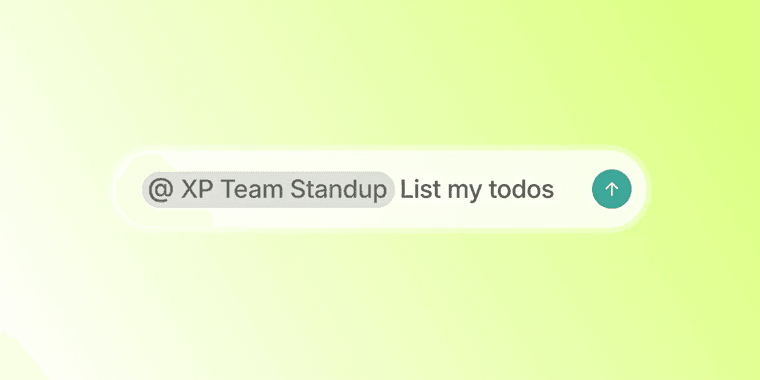
Granola has rolled out a significant update to its chat functionality, introducing @ mentions for previous meetings. This enhancement allows users to directly reference past meetings within conversations, triggering the AI assistant to perform actions, generate summaries, or compile lists based on those specific meeting notes.
Enhanced Meeting Note Integration
The new @ mention capability transforms how teams interact with their meeting history. Instead of manually searching through notes, users can now simply type @ followed by the meeting name or date in Granola Chat. The AI assistant immediately recognizes the reference and provides relevant information or performs requested tasks. This feature builds on Granola's existing note-taking app foundation, making it easier to access and utilize meeting insights across your organization.
For teams using multiple collaboration tools, this integration bridges the gap between recorded meetings and ongoing conversations. The system works seamlessly with Granola's audio transcription capabilities, ensuring that even voice-recorded meetings become instantly accessible through simple chat commands.
Practical Applications and Workflow Benefits
Imagine wrapping up a project kickoff meeting and later needing to reference the action items. Instead of scrolling through lengthy notes, you can now type "@ProjectKickoff show action items" in any chat. The AI will instantly display the relevant tasks. This functionality extends to requesting summaries, finding specific decisions, or even generating follow-up emails based on meeting content.
The feature integrates particularly well with AI agents and assistants workflows, allowing for natural language queries about past discussions. For remote teams relying on remote team chat platforms, this creates a more connected experience where meeting context flows directly into daily communication channels.
Pros and Cons
Advantages
- Instant access to meeting notes without manual searching
- Natural integration with existing chat workflows
- Supports multiple query types – summaries, actions, lists
- Works with both text and voice-transcribed meetings
- Reduces context switching between apps
- Enhances team collaboration efficiency
- Leverages existing meeting data intelligently
Disadvantages
- Requires consistent meeting naming conventions
- May have learning curve for non-technical users
- Dependent on quality of original meeting notes
- Limited to meetings recorded within Granola
Conclusion
Granola's @ mention feature represents a meaningful step forward in meeting note accessibility and utility. By bridging the gap between recorded discussions and active conversations, teams can maintain better context and make more informed decisions. This enhancement positions Granola as a more integrated solution for organizations seeking to optimize their meeting workflows and knowledge management processes.
Frequently Asked Questions
How does Granola's @ mention feature work for meeting notes?
Users can type @ followed by a meeting name or date in Granola Chat to reference past meetings. The AI assistant then provides summaries, action items, or performs other tasks based on the referenced meeting notes.
What types of queries can I make using the @ mention feature?
You can request meeting summaries, action item lists, specific decisions, follow-up content, and various other meeting-related information through natural language queries using the @ mention syntax.
What is the maximum number of meetings that can be referenced with @ mentions?
There is no specified limit; users can reference any meeting recorded in their Granola account, as long as they have access permissions.
Can @ mentions be used in group chats within Granola?
Yes, the @ mention feature is available in both individual and group chat conversations, allowing seamless collaboration.
Is there an alternative way to search for meetings besides @ mentions?
Yes, Granola also provides a dedicated search function for meetings, but @ mentions offer a faster, context-aware access directly in chat.
Relevant AI & Tech Trends articles
Stay up-to-date with the latest insights, tools, and innovations shaping the future of AI and technology.
Stoat Chat App: Complete Guide to Revolt Rebranding and Features
Stoat chat app rebranded from Revolt due to legal pressures, maintaining all user data, features, and privacy focus without any required actions from existing users for a seamless transition.
Zorin OS 18: Modern Linux OS with Windows App Support & New Features
Zorin OS 18 is a Linux distribution with a redesigned desktop, enhanced Windows app support, and web apps tool, ideal as a Windows 10 alternative with long-term support until 2029.
AV Linux 25 & MX Moksha 25 Released with Enhanced File Manager & VM Features
AV Linux 25 and MX Moksha 25 are new Linux releases based on Debian Trixie, featuring enhanced file management with Quickemu and YT-DLP integration, tailored for multimedia production and lightweight computing.