
DriversCloud
DriversCloud is a free Windows driver management tool offering automatic scanning, updates for NVIDIA, AMD, Intel drivers, hardware health monitoring, and BSOD analysis.
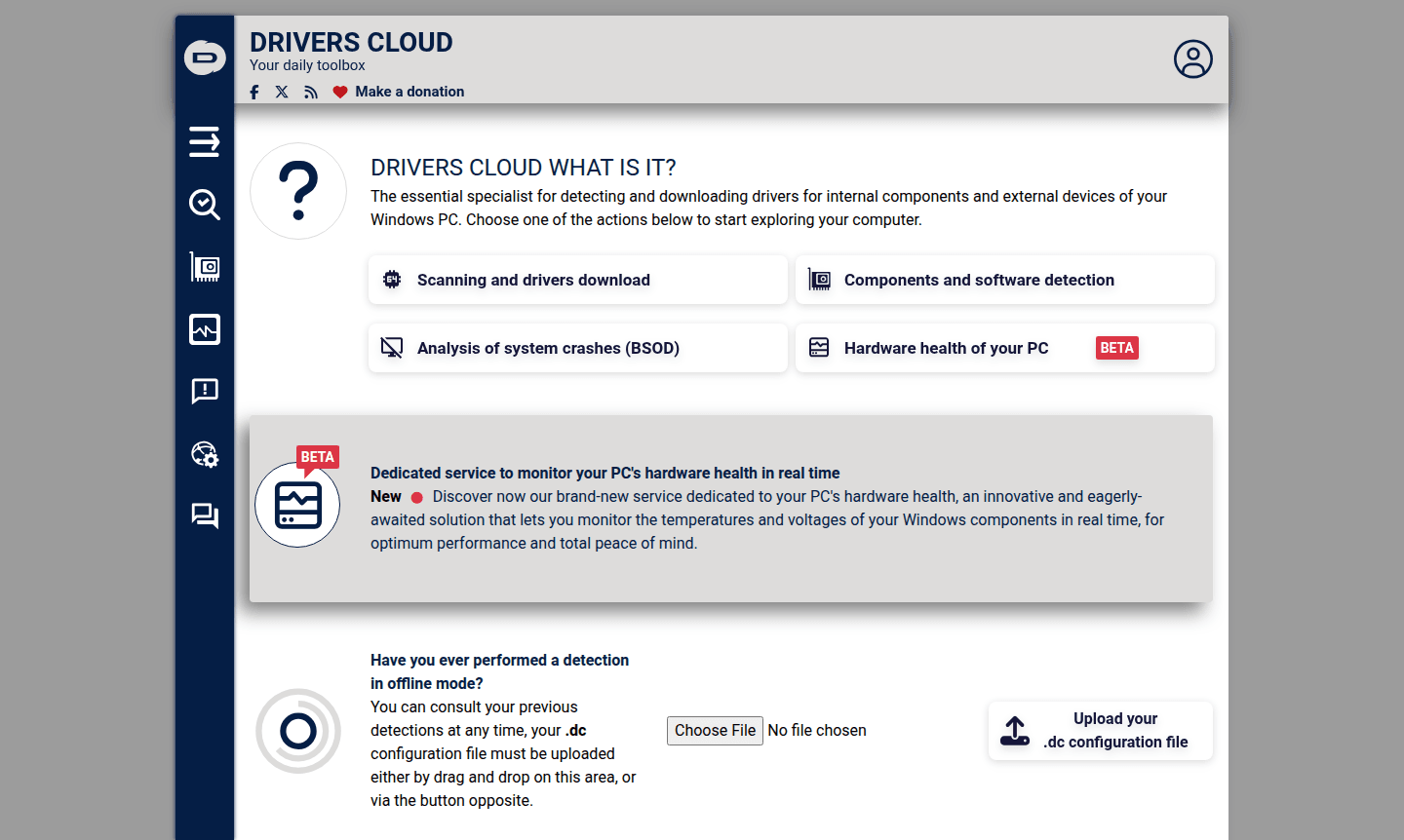
Overview of DriversCloud
DriversCloud is an essential specialist tool for detecting and downloading drivers for internal components and external devices on Windows PCs. This comprehensive platform helps users maintain optimal system performance by ensuring all hardware drivers are up-to-date, while also providing valuable diagnostic tools for troubleshooting common computer issues. Whether you're dealing with outdated graphics card drivers, audio problems, or system crashes, DriversCloud offers a centralized solution for driver management and hardware health monitoring. The tool serves a wide audience including everyday Windows users, IT professionals, and gamers who need reliable driver updates for components from major manufacturers like NVIDIA, AMD, Intel, and Realtek. With its extensive driver database and additional utilities, DriversCloud positions itself as a versatile Driver Updater and Hardware Info Tool that goes beyond basic driver scanning to provide complete system maintenance capabilities.
How to Use DriversCloud
Using DriversCloud is straightforward: simply visit the main website and choose from several available actions to start exploring your computer. You can initiate a scanning process to detect outdated drivers, download the latest versions directly from the platform, or analyze system crashes through BSOD analysis tools. The service also offers a beta hardware health monitoring feature that lets you track temperatures and voltages of Windows components in real time for optimal performance. For offline access, you can upload previously saved .dc configuration files to consult your detection history at any time.
Core Features of DriversCloud
- Comprehensive Driver Scanning – Automatically detects outdated drivers for internal and external Windows devices for optimal updates.
- Extensive Driver Database – Provides latest drivers from major manufacturers including NVIDIA, AMD, Intel, and Realtek for reliable coverage.
- Hardware Health Monitoring – Beta feature tracks component temperatures and voltages in real time for system optimization.
- BSOD Analysis Tool – Helps diagnose and troubleshoot system crashes through detailed blue screen error analysis.
- Offline Detection Support – Allows users to upload saved .dc files to access scan results without internet connection.
Use Cases for DriversCloud
- Windows users needing automatic driver updates for graphics cards, audio devices, and network adapters
- Gamers seeking optimal performance through updated NVIDIA and AMD graphics drivers
- IT professionals troubleshooting system crashes with BSOD analysis tools
- PC enthusiasts monitoring hardware health through temperature and voltage tracking
- Users with multiple Windows devices requiring centralized driver management
- Individuals troubleshooting audio issues with Realtek driver updates
- System administrators maintaining driver consistency across organizational computers
Support and Contact
For support and inquiries, visit the FAQ page for common questions and troubleshooting guidance. Additional resources include detailed tutorials available through the website. For direct assistance, contact via email at contact@driverscloud.com.
Company Info
DriversCloud operates as a web-based driver management platform focused on Windows systems, maintaining an active community forum for user discussions and technical knowledge sharing.
Login and Signup
Access DriversCloud services directly through the main website without requiring account creation for basic scanning and driver download functions. Advanced features may utilize community forums for enhanced functionality.
DriversCloud FAQ
What is DriversCloud and what does it do?
DriversCloud is a comprehensive driver management tool that scans Windows systems for outdated drivers, downloads updates, and provides hardware health monitoring and crash analysis.
Is DriversCloud free to use for driver updates?
Yes, DriversCloud offers free driver scanning and download services without requiring account creation or subscription fees for basic functionality.
Which hardware manufacturers does DriversCloud support?
DriversCloud supports major manufacturers including NVIDIA, AMD, Intel, Realtek, Creative, 3Dconnexion, DisplayLink, and SteelSeries for comprehensive driver coverage.
Can DriversCloud help with Windows blue screen errors?
Yes, DriversCloud includes a BSOD analysis tool that helps diagnose system crashes by examining blue screen error information for troubleshooting.
Does DriversCloud work with Windows 11 and Windows 10?
Yes, DriversCloud fully supports both Windows 11 and Windows 10 systems for driver detection, updates, and hardware monitoring features.
DriversCloud Reviews0 review
Would you recommend DriversCloud? Leave a comment
DriversCloud Alternatives
The best modern alternatives to the tool
New Tools Releases
Recently added tools
